Issue trackers: Jira, GitHub and TFS
Note
Required role: Account admin
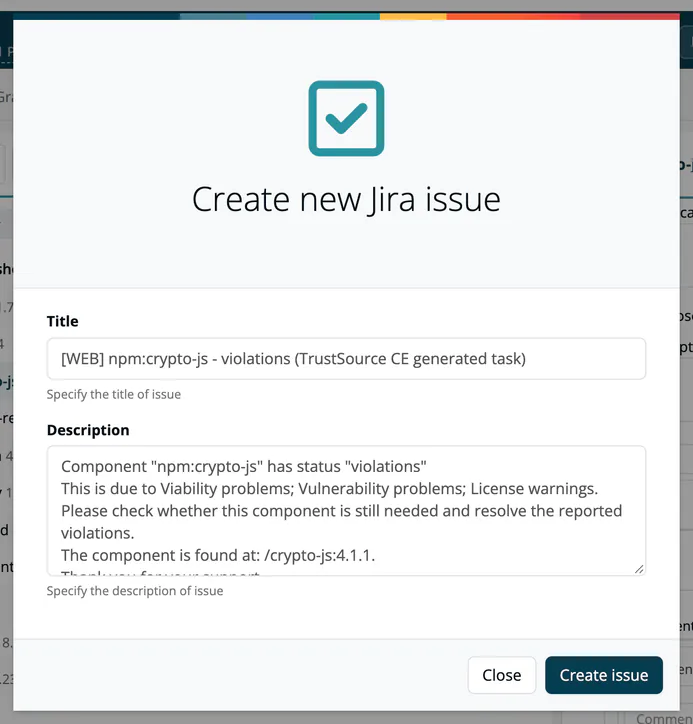
Connect an issue tracker once for the whole company of TrustSource CE. Afterwards, users see a Create issue link next to findings, for example in module component views, risks, algorithm findings and SW Quality scan results. It opens a dialog with a Title and a Description and files the issue in your tracker. A created issue shows its status next to the finding, and a creation also fires the Task trigger of webhooks and channels. The Issue report under Reports lists the issues of a project.
Open the settings from Administration → Integrations.
Jira
Select the Jira tile. Use the switch at the top to choose how issues reach Jira: API or Email.
| Field | Mode | Description |
|---|---|---|
| Project key | both | The Jira project the issues belong to, for example SEC. |
| Company url | API | The address of your Jira, for example https://jira.acme.example. |
| User | API | The Jira account that creates the issues. |
| Password | API | The password or API token of that account. Leave empty to keep the stored value. |
| Email address | The receiver address that turns incoming mail into Jira issues. | |
| Active | both | Turns the integration on. |
Select Update to save. Switching between API and Email is saved immediately.
Note
In Email mode TrustSource CE mails the issue to the receiver address through the installation's SMTP server. The issue then shows the status "CREATED" but has no link into Jira, because Jira creates the issue later.
For Jira Cloud use an API token as password.
GitHub
Select the Github tile.
| Field | Description |
|---|---|
| Access Token | A personal access token that may create issues. Leave empty to keep the stored value. |
| Repository | Optional repository in the form owner/repo. |
| Active | Turns the integration on. |
TFS and Azure DevOps
Select the TFS tile ("Configure TFS / Azure DevOps integration settings").
| Field | Description |
|---|---|
| Account or URL | Your account name or the full collection URL, for example https://dev.azure.acme.example/acme. A plain name such as acme becomes https://acme.visualstudio.com/defaultcollection; the page shows the resulting address next to the field. |
| Project | The project that receives the work items. |
| Access Token | A personal access token. Leave empty to keep the stored value. |
| Active | Turns the integration on. |
Warning
The tracker must be reachable from the TrustSource CE server under a public address. Servers on private or loopback addresses are refused. See Integrations.
Related
- Integrations
- Issue Integration (Project): override the settings for one project
- Integration Troubleshooting