Vulnerability Lake
The Vulnerability Lake shows the vulnerabilities that OSV reported for the components this installation of TrustSource CE has analysed. It is a local cache, not a copy of a public vulnerability database: a component appears here once one of your analyses has looked it up. Open it from Knowledge → Vulnerability Lake; the page is titled Vulnerability lake ("Vulnerabilities OSV reported for the components this installation analysed").
A button group at the top switches between three modes. Your search term is kept in the page address, so you can bookmark or share a result.
| Mode | Use it to |
|---|---|
| Component | Find the cached vulnerabilities of a component. |
| Find vuln | Open the details of one vulnerability. |
| Find CWE | Read a weakness description with consequences and mitigations. |
How the cache is filled
During each module analysis, TrustSource CE asks OSV (api.osv.dev) for the vulnerabilities of the components found and stores the answers here. If your installation sets TS_OSV_ENABLED=false, no lookups happen and the cache stays as it is. See External Services.
Component
Type at least two characters of a component name, for example lodash or npm:lodash. The menu entry opens this mode with lodash as an example. The result has one row per cached component version:
| Column | Content |
|---|---|
| Score | The highest CVSS base score among its vulnerabilities, coloured by severity. |
| Component | The component key. |
| Version | The analysed version. |
| Vulnerabilities | The vulnerability ids, each linking to Find vuln. |
| Checked | When OSV was last asked. |
Find vuln
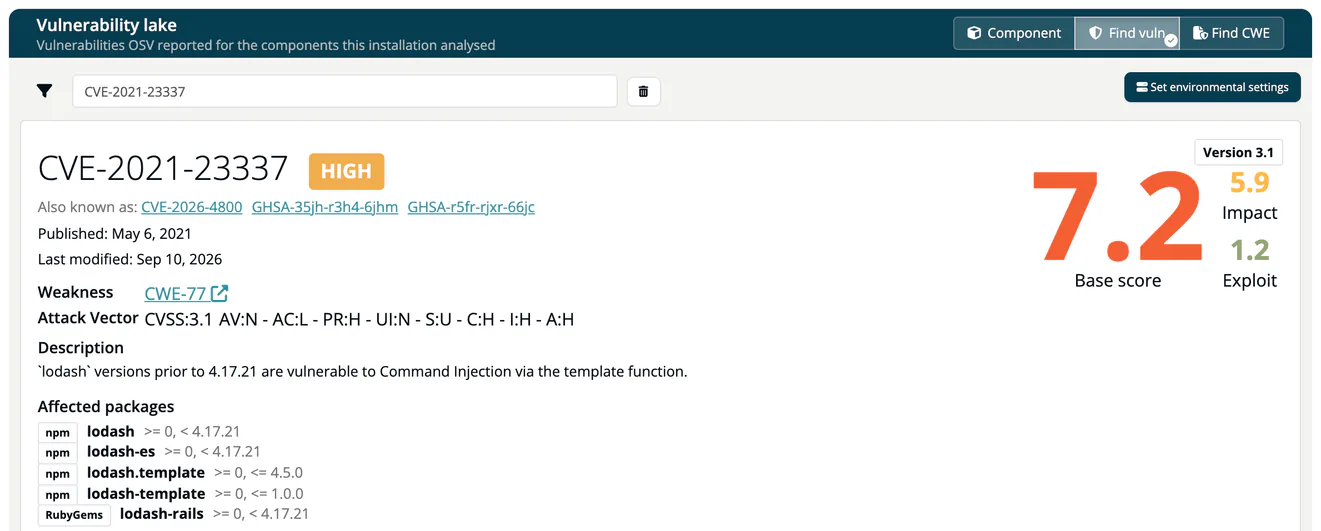
Enter a CVE, GHSA or other OSV id, for example CVE-2020-8022. The detail view shows:
- the id with its severity label and, where applicable, a GitHub reviewed marker, and the other ids it is known by (Also known as);
- the publication and modification dates and the linked Weakness;
- the attack vector and the CVSS scores (v4.0, v3.x and v2.0 where available; switch between versions with the arrow button);
- the description, the assigned CPEs, the Affected packages with their version ranges and the References.
Set environmental settings lets you adjust the CVSS vector to your environment (modified attack vector, complexity, privileges and so on); the environmental score is recalculated for that vector.
Only vulnerabilities found by this installation's analyses can be opened. Other ids return no result.
Find CWE
Enter CWE-915, 915, cwe915 or CWE:915. The page shows the Description, Extended Description, Common Consequences, Potential Mitigations and Detection Methods of the weakness. The CWE catalog ships with TrustSource CE, so this mode works for every CWE id, also without internet access. CWE badges elsewhere in the app, for example on SARIF findings and risks, link here.
Note
The SaaS edition's expert product search, query subscriptions and Vulnerability activity page are not part of TrustSource CE. EPSS scores appear in the Vulnerability report.