Release keys
Note
Required role: Account admin, Manager or Compliance manager. The API keys menu entry is shown to Account admins only; Managers and Compliance managers open the page at /settings/company/api/releases.
A release key lets someone fetch the documents of one approved release of TrustSource CE without a login or API key. Use it to ship the key with your product, for example as a QR code on a device or in a customer portal.
Anyone who holds the key can read what it serves. Treat it like a password. Because the key is part of the URL, it also appears in the app log and in reverse proxy access logs; restrict who can read them. See Public routes.
Before you start
You need at least one approved release. Without one, Create New stays disabled and the page shows "No approved releases available to start publish". See Approve / Reject.
Which documents a key serves
A release key serves the documents of its release under https://<your-host>/api/v2/compliance/releases/<release_key>/...:
| Scope | Route | Content |
|---|---|---|
sbom |
/sbom |
The SBOM of the release, with a signature. |
notice |
/notice |
The notice file, with a signature. |
csaf |
/csaf, /csaf-changes |
The CSAF VEX document of the release, and the changes since the release. |
The scope decides which of these routes answer. A key without a scope serves all of them. A route outside the scope, or an unpublished key, answers with 404.
The signatures are HMAC integrity checks made with TS_ENCRYPTION_KEY. Only the installation that issued them can check them, under Outbound → Verify, which needs a login. Recipients cannot verify them on their own; they are not public signatures. See Verify.
Create and publish a key
- Open Administration → API keys and select the Release keys card.
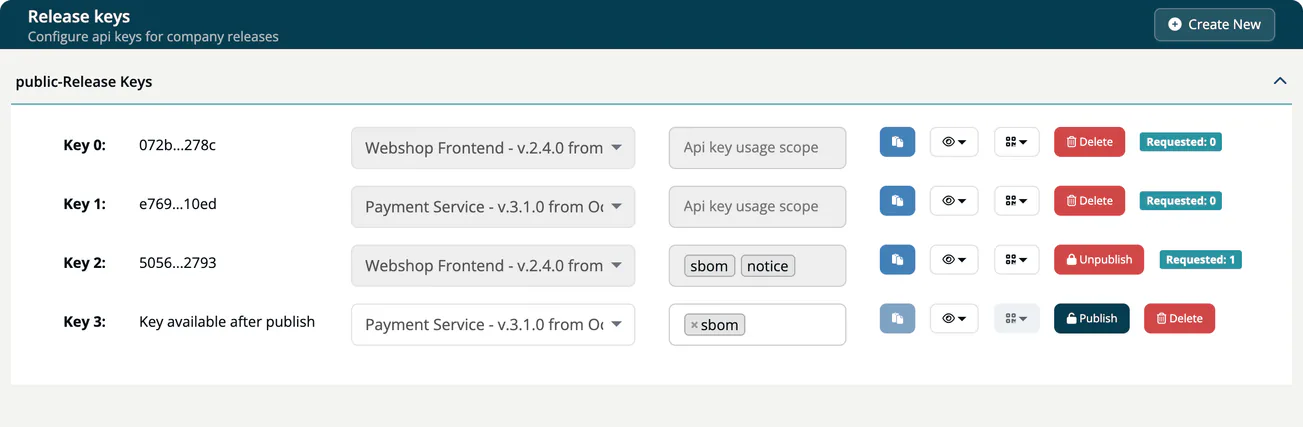
- Select Create New. A new unpublished row appears.
- Choose the release in the first drop-down. Each entry shows the name, version and approval date.
- Choose the scope: any of
sbom,notice,csaf. - Select Publish.
While a key is published, its release and scope are locked. To change them, unpublish the key first.
Preview, URL and QR code
- The eye button opens a preview of the SBOM, the Notice or the CSAF document.
- The QR button, available for a published key, shows the URL and a QR code for the SBOM, the notice or the CSAF document. The URL is built from
ROOT_URL, so it must be the public address of your installation. - The green badge Requested counts how often the key was used.
Unpublish and delete
The red button depends on usage. A key that was requested at least once shows Unpublish; a key that was never requested shows Delete. A deleted key cannot be restored. An unpublished key can be published again.
Tip
When a relationship with a customer or partner ends, or a key may have leaked, rotate it: create a new key for the same release, hand it to the recipients who should keep access, then unpublish the old one.
Keys created by releasing an approval
When the documents of an approval are released, TrustSource CE creates a published release key without a scope for that approval, so all four routes answer. You find it in this list like any other key.