Vulnerability Lake
The Vulnerability Lake is TrustSource's searchable database of known vulnerabilities (CVE, GitHub Security Advisories) and weaknesses (CWE). Use it to look up a product, a single CVE or a weakness without opening a project. Open it from Knowledge → Vulnerability Lake.
A button group at the top switches between five search modes. Your search term is kept in the page address, so you can bookmark or share a result.
| Mode | Use it to |
|---|---|
| Simple | Find products or advisories by name or description. |
| Expert | List the CVEs of a product, optionally down to a version. |
| Find CVE | Open the full details of one CVE. |
| Find CWE | Read a weakness description with consequences and mitigations. |
| My subscriptions | Manage the queries you have subscribed to. |
Simple
Pick By product/org to search for a vendor or product (for example quarkus). The result lists the total number of vulnerabilities, the Org:Product and the CVE ids. Select a product to continue in Expert mode. Pick By description to search the advisory text, a vulnerability id or a source; the result shows the Vuln id and Description. Use Load more to see further hits.
Expert
Enter a product query in the form vendor:product:version, for example apache:tomcat:4.1. The result table shows Score, CVE Id, Weakness, Base Score (vectoral), Description and Modified. A Filter by weakness list narrows the hits to one CWE.
Subscribe saves the current query; Unsubscribe removes it. The trash button resets the filters.
Find CVE
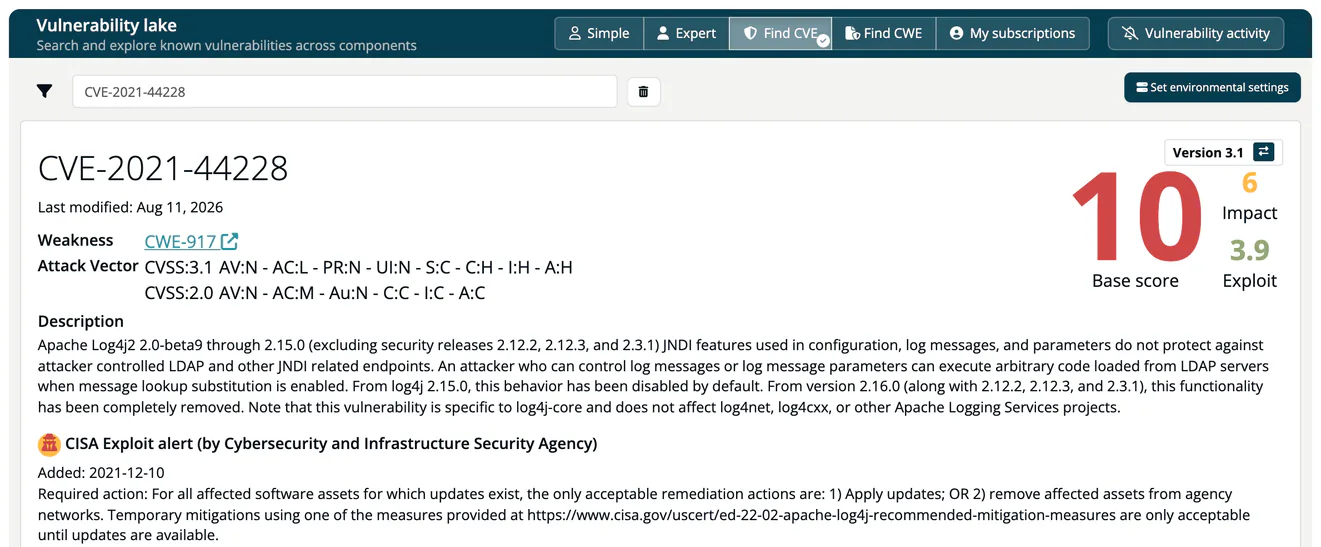
Enter a CVE id such as CVE-2020-8022. The detail view shows:
- the severity label, the GitHub-reviewed marker and other names (aliases) of the vulnerability;
- publication and modification dates and the linked Weakness;
- the attack vector and the CVSS scores (v4.0, v3.x and v2.0 where available);
- a CISA Exploit alert with the date added and the required action, if the CVE is on the CISA Known Exploited Vulnerabilities list;
- the description, the assigned CPEs, the Affected packages with their version ranges and the References.
Set environmental settings lets you adjust the CVSS 4.0 vector to your environment (modified attack vector, complexity, privileges and so on); the score is recalculated for that vector.
Note
EUVD identifiers and EPSS scores are available through the REST API. The EPSS probability also appears in the CVSS-vs-EPSS chart of the Vulnerability report.
Find CWE
Enter CWE-915, 915, cwe915 or CWE:915. The page shows the Description, Extended Description, Common Consequences, Potential Mitigations and Detection Methods of the weakness. A link with the prefix, shared or bookmarked, opens it directly.
My subscriptions
Lists every query you subscribed to with Query and a Remove action. To add one, enter a query and press Subscribe; the eye button previews its current results.
Vulnerability activity
Users with the Company Security Manager role (company_security_manager) see an extra Vulnerability activity button. It opens the page where status changes and mutes are tracked, with tabs for False positive, Not in use, Won't fix, Fix to be implemented, Fix has been provided and Other, and a Recent activity history. See Reports.