Vulnerability Report
Note
Opening the report: every role that sees Internal → Reports (Developer, Compliance manager, Manager). Treatments (Create CSAF, Add risks, Mute CVEs): Manager or Company security manager. Export as CSAF: Manager, Compliance manager, Company security manager or Account admin.
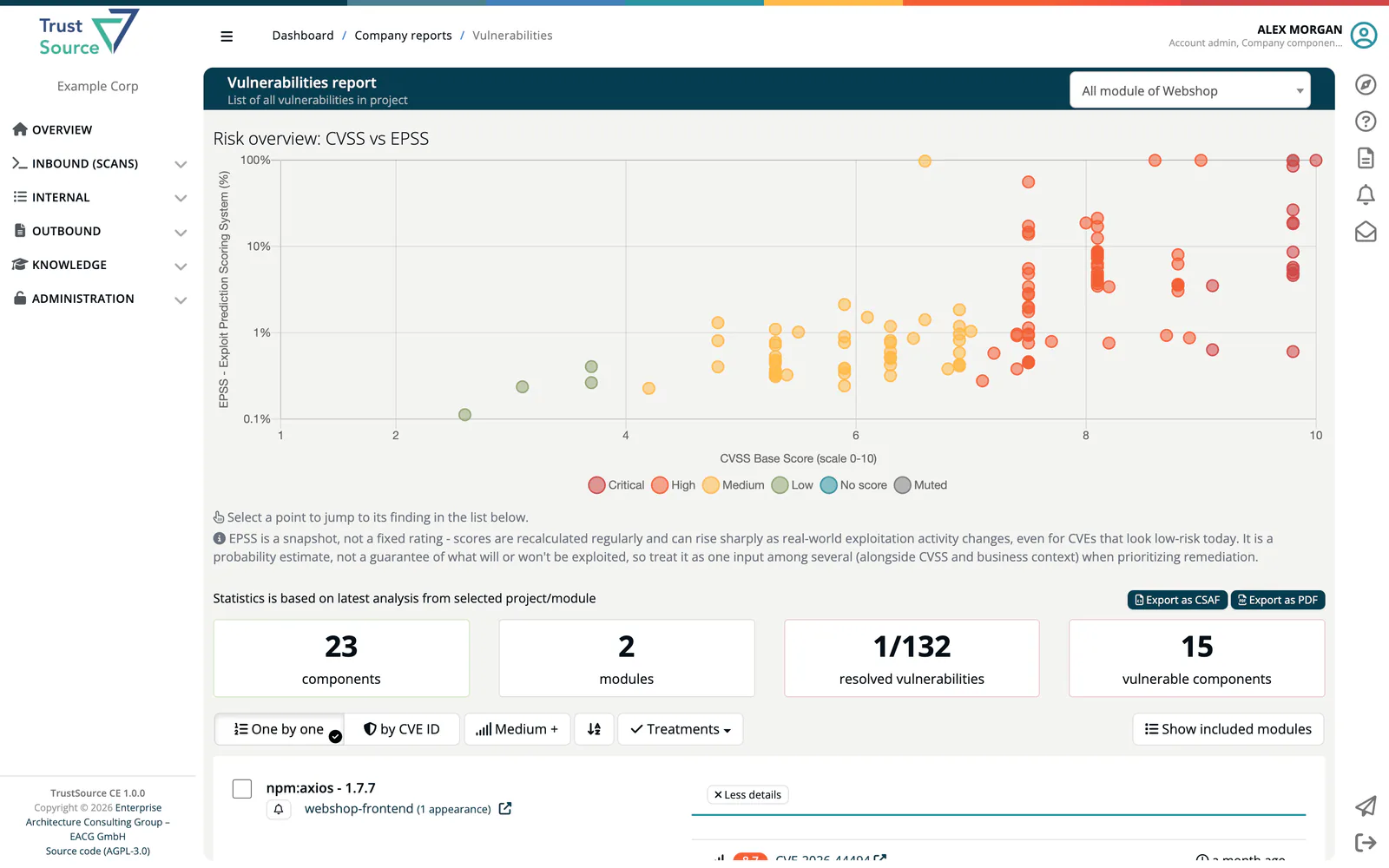
The Vulnerability report (Reports → Vulnerability report, page title Vulnerabilities report) lists every known vulnerability affecting the components of a project or module in TrustSource CE. The statistics are based on the latest analysis of the selected project or module.
Choose what the report covers
Pick the target at the upper right: All module of project, or a single module. The report can also be opened from a project's or module's Reports dropdown, with the target preselected. Show included modules lists the modules and the analysis each one contributes.
The counters show components, modules, resolved vulnerabilities (muted / total) and vulnerable components.
CVSS vs. EPSS chart
At the top, the chart Risk overview: CVSS vs EPSS plots every finding by its CVSS severity score against its EPSS score: the probability, published by FIRST, that the vulnerability will be exploited in the wild in the next 30 days. This helps you prioritise: a high-CVSS finding with a low EPSS score is a lower real-world risk than a moderate finding that EPSS ranks as likely to be exploited. Select a point to jump to its finding in the list. The chart is also included in the PDF export.
EPSS scores are fetched from FIRST (api.first.org) when the report is built. If your installation sets TS_EPSS_ENABLED=false, or FIRST has no score for a vulnerability, the finding is plotted at the floor of the chart and its tooltip reads "EPSS: no score available (shown as <0.1%)". See Environment Variables and External Services.
Read the list
- One by one lists each vulnerable component with its vulnerabilities; by CVE ID groups the findings by vulnerability.
- The confidence selector filters by how certain the match between component and vulnerability is: High only, Medium + or All. It starts at the confidence level configured for the module or project, otherwise Medium +.
- The sort button switches between ascending and descending order.
Treatments
Select findings with their check boxes, or use none to act on all findings currently shown, then open Treatments:
| Action | What it does |
|---|---|
| Create CSAF | Builds a CSAF VEX advisory from the selected findings and opens Outbound → CSAF, where it appears as a draft. |
| Add risks | Asks for an impact description, then creates one risk per vulnerability and module in the risk register, with the origin Vulnerability (CVE) and the state identified. |
| Mute CVEs | Asks for a reason, then adds the vulnerabilities to the allowed vulnerabilities of the affected modules, with the reason, your name and the date. The modules are marked for re-analysis. See Module settings: Allowed vulnerability. |
A reason or description is mandatory for Add risks and Mute CVEs.
Export
- Export as PDF downloads
<project>-vulnerabilities-report.pdfwith your company logo and the chart. If the export fails with a logo message, check the logo URL under Administration → Settings → General info. - Export as CSAF creates a CSAF VEX draft for the report's findings and downloads it as
<project or module>-CSAF.json. The draft is also listed under Outbound → CSAF.