Post-Release Vulnerability Tracking
Once a module is approved and released, TrustSource CE keeps comparing the frozen components of the release with the vulnerabilities it knows. This matters for CRA and NIS2: you must respond to new vulnerabilities even after shipping.
Where vulnerability data comes from
TrustSource CE looks up vulnerabilities in OSV while it analyses modules, and stores them in the Vulnerability Lake. Manual vulnerabilities from Administration → Settings → Manual vulnerability are included too. A vulnerability that is published after your release becomes visible once an analysis has fetched it, for example the next analysis of a module that uses the same component.
If OSV lookups are switched off (TS_OSV_ENABLED=false), no new vulnerabilities arrive. See External services.
What you see on the release
Open the release under Internal → Releases.
- New vulnerabilities: the vulnerabilities that affect the released components and were not part of the approval, with the counters new vulnerabilities, resolved vulnerabilities and vulnerable components. Export as CSAF creates a CSAF VEX draft from this list under Outbound → CSAF and downloads it as JSON.
- Vulnerabilities: the vulnerabilities as they were known at approval.
- Export control: the crypto algorithms detected in the release.
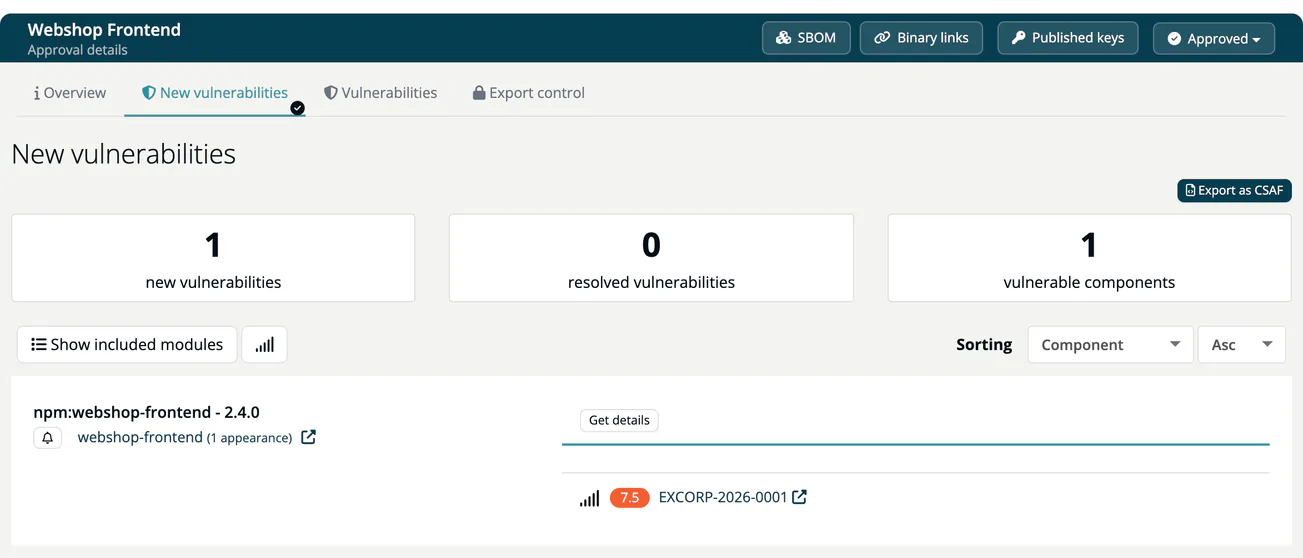
External parties that hold a release key can read the same changes as a CSAF VEX document from /api/v2/compliance/releases/{release_key}/csaf-changes.
Alerts
TrustSource CE can tell you about new vulnerabilities without anyone opening the release. Alerts are delivered through Webhooks and Channels, either for the whole company (Administration → Integrations) or for one project (project settings). Choose a vulnerability trigger:
| Trigger | One message per | Compared against |
|---|---|---|
| Vulnerability | component | the project's current components |
| Vulnerabilities by module | module | the project's current components |
| Vulnerabilities by project | project | the project's current components |
| Vulnerabilities in releases | release | the frozen components of each release |
For released versions, use Vulnerabilities in releases. A webhook may carry several triggers; you then receive the same finding at several granularities.
How the sweep works
- A background job checks the projects that have a webhook with a vulnerability trigger. It runs 5 minutes after the server starts and then every 60 minutes, a batch of 25 projects per run, oldest-checked first.
- The first check after you add such a webhook records the current state as baseline and sends nothing. Later checks report only vulnerabilities that are new since then.
- Operators can tune the job with
TS_VULN_ALERT_SWEEP(falseswitches it off),TS_VULN_ALERT_INTERVAL_MIN,TS_VULN_ALERT_PROJECT_BATCHandTS_VULN_ALERT_RELEASE_BATCH. These settings are read by the app but not passed through by the referencedocker-compose.yml; set them with a compose override. See Environment variables.
Tip
Send release alerts to the channel of the team that maintains the released version, for example a Microsoft Teams Workflow or Slack channel.
Related
- Releases: managing released versions
- Vulnerability Lake: the vulnerability data
- Recipe: React to a 0-day