Tab: Solutions
Note
Required license feature: products
Editing: developer, compliance_manager, company_security_manager or account_admin
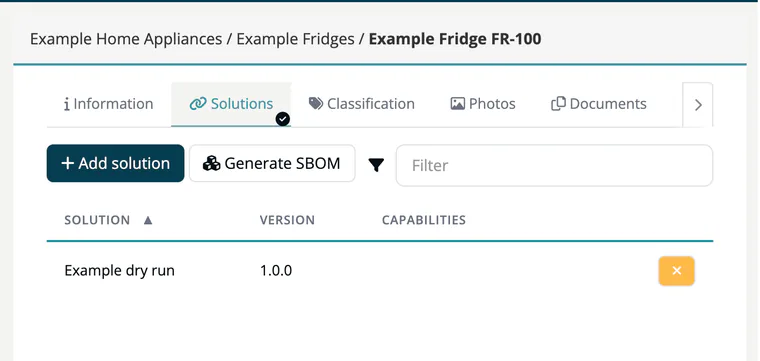
A solution is an approved release that makes up the product. This is how a product connects to the software you build. The tab lists each solution with its Solution name, Version and Capabilities (the capabilities recorded for that approval).
Add a solution
- Click Add solution.
- In the dialog, find the release by Approved date, Name, Version or Contact (the approver). Only approved releases are listed.
- Click Add next to it.
A confirmation "Solution successfully added" appears. See Link with Release for the background.
Remove a solution
Click the x button at the end of the row. The release itself is not affected.
Generate an SBOM
Click Generate SBOM, then Generate SBOM again in the dialog (Generate SBOM by solutions). TrustSource merges the SBOMs of all listed solutions into one CycloneDX JSON file and stores it on the Documents tab as SBOM file, replacing a previous one; the message "SBOM generated and uploaded into documents" confirms it. A solution whose release has no stored SBOM is skipped. Finish your selection of solutions first. Without solutions, generation fails with "No solutions selected for product".
Related
- Products overview - all eight product tabs