Impact and Portfolio Reports
Note
Required role: every role that sees Internal → Reports (Developer, Compliance manager, Manager). Tiles with narrower roles are marked below.
These reports from the Reports hub look across your portfolio in TrustSource CE: which projects are hit by a component, a CVE or an algorithm, where your crypto policy is violated, which commercial components you use, and what your issue trackers hold. Single-project reports are on Analysis Reports.
Impact reports
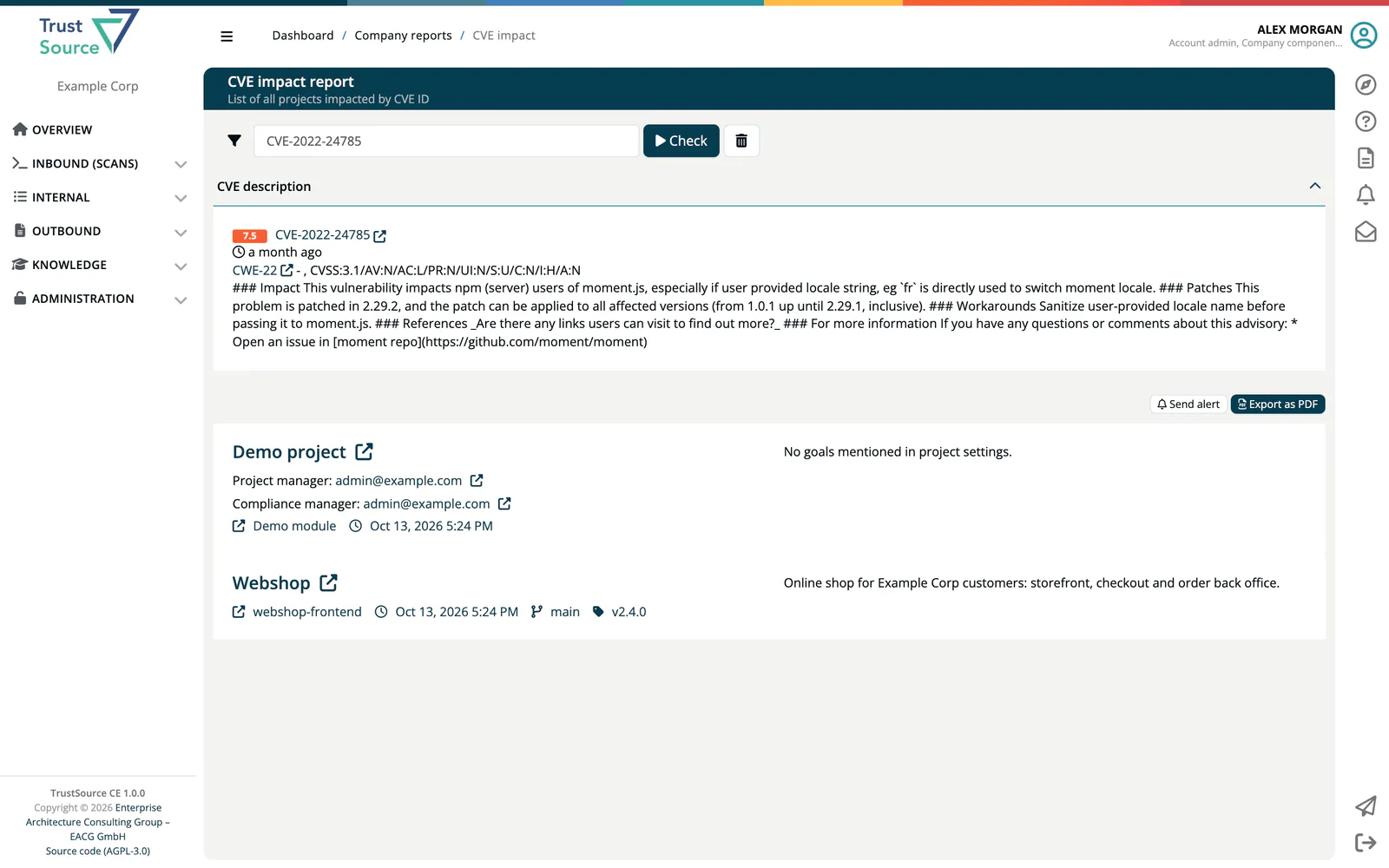
Use an impact report when a component problem, a CVE or a banned algorithm is announced and you need to know which projects are affected. All three work the same way:
- Enter the value in the filter bar.
- Click Check. Click the trash button to reset the filters.
- Read the list of impacted projects. Each entry shows the project, its project manager and compliance manager (with email), and the affected modules.
- Click Send alert to notify the people responsible (component and CVE reports), or Export as PDF.
| Report | Filter | Role | Extra details |
|---|---|---|---|
| Component impact | Select component (type to search), then optionally Select version | Compliance manager, Manager, Portfolio manager | Component description with a link to the component page. |
| CVE impact | A CVE id, for example CVE-2021-25322 |
all report roles | CVE description with bump hints, weakness (CWE), vector, exploit and impact scores. If no project is affected, the page says No impact. |
| Algorithm impact | Select algorithm | all report roles | Algorithm and strength, with the B label if it is on your company's deny list. |
The CVE impact report uses the vulnerability data this installation collected during its own analyses; see Vulnerability Lake.
All bad crypto
Roles: Company security manager, Compliance manager, Portfolio manager.
Lists projects that violate your company crypto policy (page title All bad crypto overview). Select a project or Whole portfolio. Counters: modules, components with algorithms, detected algorithms, managed algorithms, algorithms in use, coverage. Each project lists its algorithms; those on your company's deny list carry a red B.
- View components and modules opens the project.
- Send alert to project manager notifies the responsible person.
- Create issue opens a GitHub issue form when a GitHub repository is known. Otherwise Copy details copies the issue text.
Manage the crypto policy under Administration → Policies → Crypto algorithms, and company-specific algorithms under Administration → Settings → Private algorithms. See Policies.
COTS overview
Lists the commercial off-the-shelf components of a project with their links (homepage, repository, issues, release notes, provider) and commercial terms: Right to re-sell, Right to distribute, Right to host/operate as SaaS and Right to modify. Each entry links to the module that uses it (Used in module ... or Used as module). Counter: components. COTS data is maintained in the COTS catalog.
Dependent projects
Select a project to list all projects that depend on it, with their description, project manager and compliance manager. Use it to see who is affected before you change a shared project.
Components
Role: Company component manager. Also reachable from the Critical components button in the Component Lake.
Select a project to list the components of its modules whose catalog data is incomplete: a version without license, a license without key, or no repository URL. Counters: modules, critical components. Each entry opens the component's edit page in a new tab. See Critical Components.
Issue report
Shows the tasks of a project from your issue tracker. Select the project at the upper right. When TFS, Jira and GitHub are all available, a second selector switches between TFS, Jira and GitHub issues.
- Jira shows a status bar with the task count per status, then each task with status, key, summary, creator, date and description.
- GitHub and TFS list each task with title, creator and creation date. Click the link icon to open the task.
If no integration is configured for the project, the page says so and offers Setup integration; if the tracker cannot be reached, it offers Change integration settings. Configure trackers under Integrations.