Threat Model Fields
Note
Menu: Internal → Risks is shown to Developer, Compliance manager and Manager. Every user who can open a risk can edit these fields.
The Threat model tab of the risk editor in TrustSource CE records where a risk comes from in terms of threat modelling: which STRIDE categories apply, which weaknesses (CWEs) are involved, how it maps to the ENISA threat landscape, and which threat-model run and element it belongs to. Use it to link a risk to a threat model you maintain in another tool, or simply to classify risks consistently.
TrustSource CE does not generate threat models and has no Threat Models menu; you fill these fields by hand, through the Risks API, or they are set by automatic risks (the CWE of a SARIF weakness).
Where to find the fields
- In the Risk capture form when you add a risk, under Threat model context.
- In the risk editor, on the Threat model tab.
All fields are optional. Click Save in the editor to store them. If you clear every field, the threat-model data is removed from the risk.
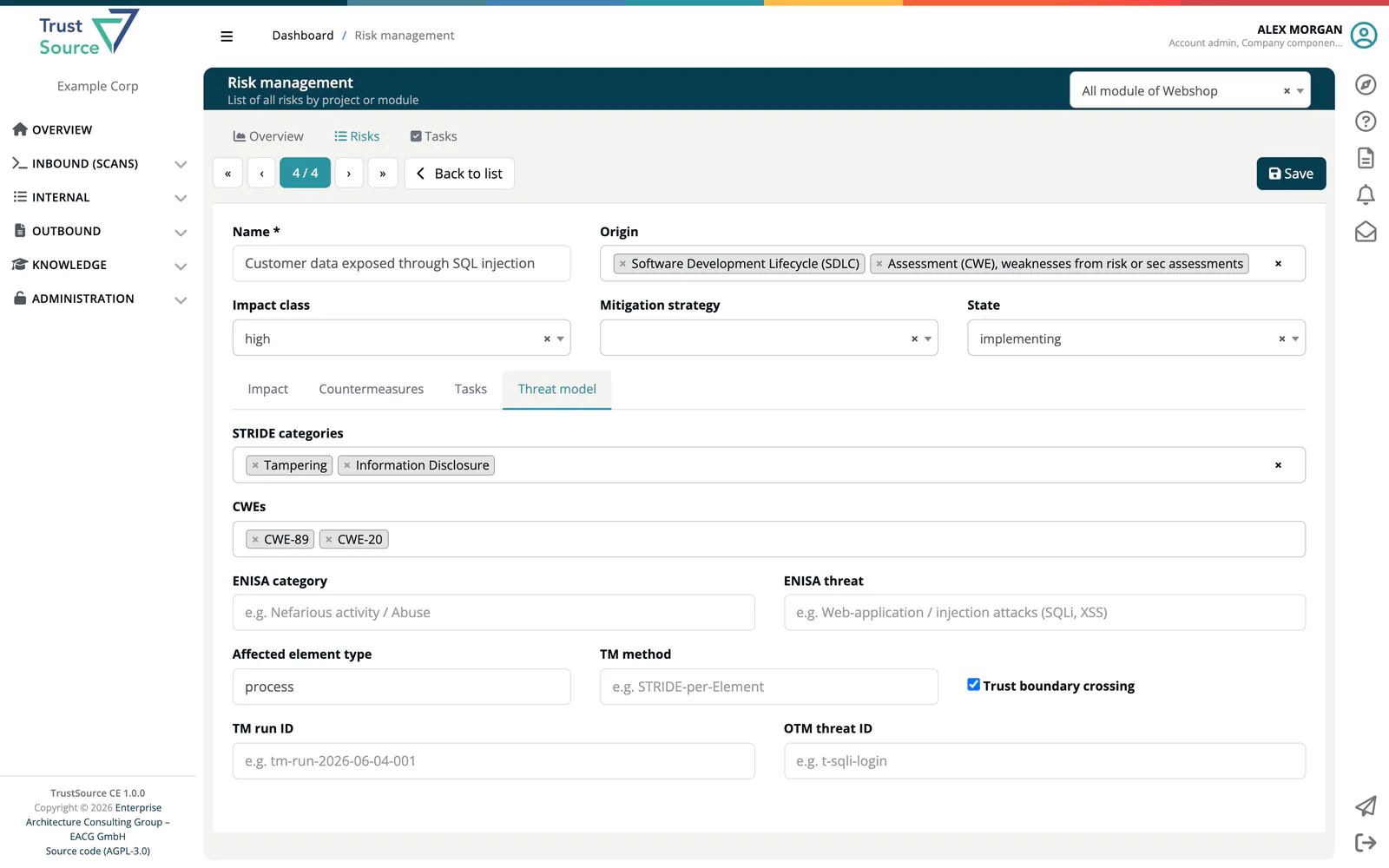
Fields
| Field | What to enter |
|---|---|
| STRIDE categories | One or more of Spoofing, Tampering, Repudiation, Information Disclosure, Denial of Service, Elevation of Privilege. |
| CWEs | Weakness ids. Type an id such as CWE-89 and press Enter; add as many as needed. |
| ENISA category | The ENISA threat category, up to 200 characters, for example Nefarious activity / Abuse. |
| ENISA threat | The ENISA threat, up to 300 characters, for example Web-application / injection attacks (SQLi, XSS). |
| Affected element type | The kind of model element the threat applies to, up to 100 characters, for example process. |
| TM method | The threat-modelling method used, up to 200 characters, for example STRIDE-per-Element. |
| Trust boundary crossing | Tick it when the threat crosses a trust boundary. |
| TM run ID | The id of the threat-model run or session the risk came from, up to 200 characters, for example tm-run-2026-06-04-001. |
| OTM threat ID | The id of the threat in an Open Threat Model (OTM) file, up to 200 characters, for example t-sqli-login. |
A countermeasure can carry the matching OTM mitigation ID; see Risk Tasks.
How the fields are used
- A risk created from a SARIF weakness starts with that weakness in CWEs. You can add or remove CWEs; later imports do not overwrite your list.
- Create risk on a SARIF finding pre-fills CWEs with the weaknesses of that finding.
- The fields are stored with the risk and returned by the Risks API. They do not change the impact class, the state or any calculation.
Related
- Risks List - the risk editor
- Automatic Risks - risks from SARIF weaknesses
- Vulnerability Lake - look up a CWE with Find CWE