Webhooks and Channels (Project)
Note
Required role: Account admin, Manager or Compliance manager. The tab is shown to everyone who opens the project settings, but the list stays empty for other roles, because webhook addresses and headers are credentials.
The Webhooks and Channels tab lists the webhooks and chat channels that receive notifications for this project, and lets you add more. Company-wide receivers are managed under Webhooks and Channels in Integrations; a receiver created here belongs to this project only.
Add a webhook or channel
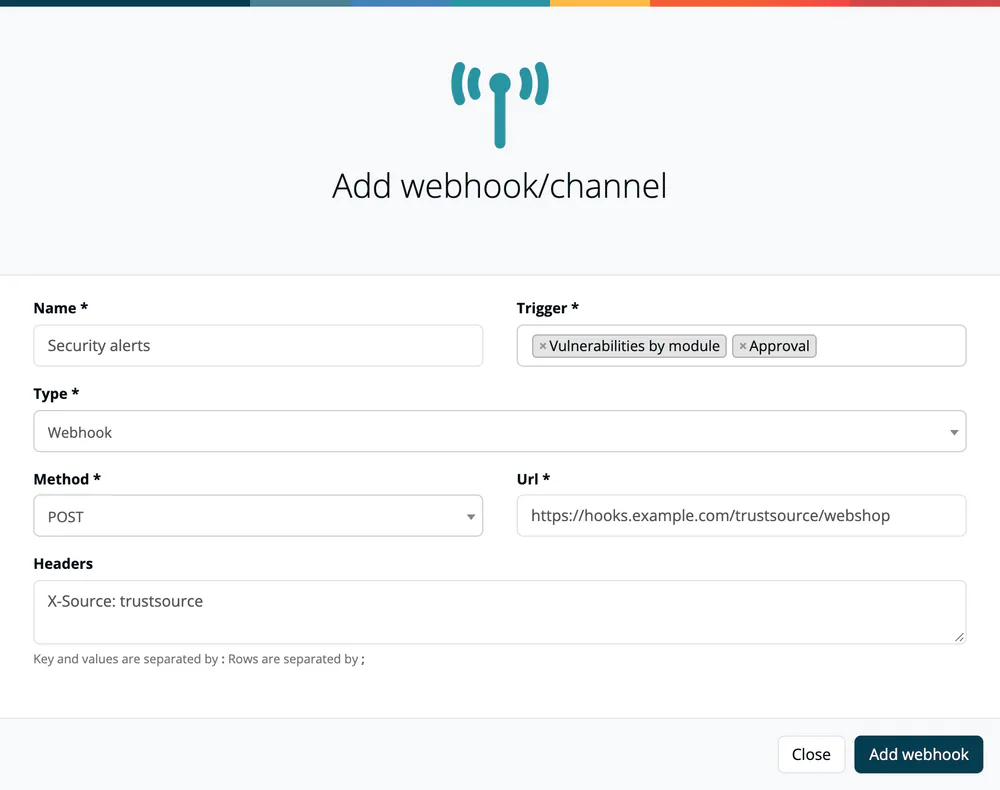
- Click Add webhook/channel.
- Enter a Name.
- Choose one or more Trigger values.
- Choose the Type and enter the target address.
- Click Add webhook.
| Type | You enter |
|---|---|
| Webhook | Method (POST, PUT, PATCH, DELETE, GET), Url and optional Headers (key and value separated by :, rows separated by ;). |
| Microsoft Teams Workflow | The "Workflow" url of the workflow "Post to a channel when a webhook request is received". |
| Slack | The "Incoming Webhook" url. |
| Microsoft Teams O365 (Deprecated - October 1st, 2024) | The "Incoming Webhook" url of the old Office 365 connector. |
Gitter (Under development) is listed but cannot be selected.
Warning
URLs and header values are credentials. Addresses that point to private, loopback or cloud-metadata hosts are refused. Deliveries are not signed: make the receiver require a secret header or a secret URL path, and use https:// targets only. See Webhooks and channels.
Triggers
| Trigger | Sends |
|---|---|
| Analysis, Release, Approval, Task | A message when that event happens in the project. |
| Vulnerability | One message per affected component when a new vulnerability matches. |
| Vulnerabilities by module | One message per module. |
| Vulnerabilities by project | One message per project. |
| Vulnerabilities in releases | One message per release, measured against the release's frozen component list. |
Choosing a vulnerability trigger is the whole configuration of vulnerability alerts; there is no separate switch. Selecting two of them delivers the same findings at two levels of detail. Turning one on does not replay existing findings. TrustSource CE checks for new vulnerabilities in a background sweep, first 5 minutes after start and then every 60 minutes.
The table shows Created, Name, Type, Triggers, URL, Method and Headers; Remove deletes an entry.