SARIF Weaknesses and Risks
Note
Required role: assigning a CWE needs Company security manager or Account admin. The project switch for automatic risks is part of the project settings.
A CWE (Common Weakness Enumeration) names the kind of weakness a finding points at, such as CWE-79 Cross-site scripting. TrustSource CE shows the CWEs of your SARIF imports, lets you add the ones a tool leaves out, and can keep one risk per weakness in the risk register.
Where CWEs appear
- Tests list, column CWEs: badges per test.
- Test page, strip CWEs above the findings: every weakness of the document with the number of findings behind it.
- Rule groups on the test page: the CWEs of that rule next to its name.
Click a badge to open the weakness in the Vulnerability Lake. Weaknesses are only taken from what the tool published, or from an assignment made by a person; TrustSource CE never guesses one.
A badge in the assigned style means that the weakness was assigned here rather than reported by the tool.
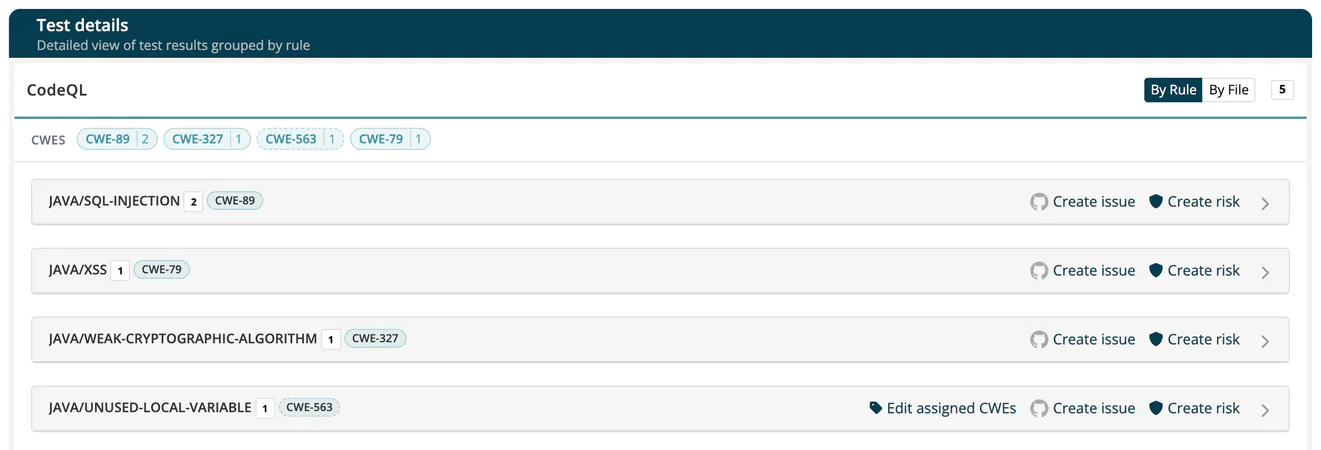
Assign a CWE to a rule
Many tools publish no CWE for their rules, so their findings cannot feed a CWE risk. You can name the weakness yourself.
- Open the test page. The strip shows how many rules are unclassified if some rules produced findings but carry no CWE.
- In the header of the rule group, click Assign CWEs.
- Enter one or more ids such as
CWE-79(up to 50) and click Save.
The assignment is stored for the combination of tool and rule and applies to every finding of that rule across your company, on documents already imported as well as future ones. It is always shown as assigned.
To change it, click Edit assigned CWEs. Withdraw assignment removes it with the same immediate effect.
- Assign CWEs is only offered on rules for which the tool published no weakness. An assignment made earlier stays editable and withdrawable.
- Assigning and withdrawing are written to Audit logs as Rules modified.
Risks from weaknesses
With the project switch Enable risk creation from SARIF weaknesses (CWE), every import for a module of that project creates or updates one risk per module, tool and weakness. See Automatic Risks for how those risks behave.
The switch is off by default and applies to future imports only. Import a test again on the module's Quality tab to get risks for an existing document.
Risks open on the Occurrences tab of the risk dialog, which lists where the weakness was found.
Risk register limits
To keep the register readable, one import creates at most 200 risks per tool, covers at most 8 tools and creates at most 400 risks in total. Runs without a usable tool name are skipped. Weaknesses over a limit are still shown on the test page; they just have no risk. TrustSource CE does not show a message when a limit is reached.
Related
- SW Quality Scans: import, status and counts
- Automatic Risks: how CWE risks are kept up to date
- Threat model fields: CWEs and STRIDE on a risk
- Tests (SARIF) API