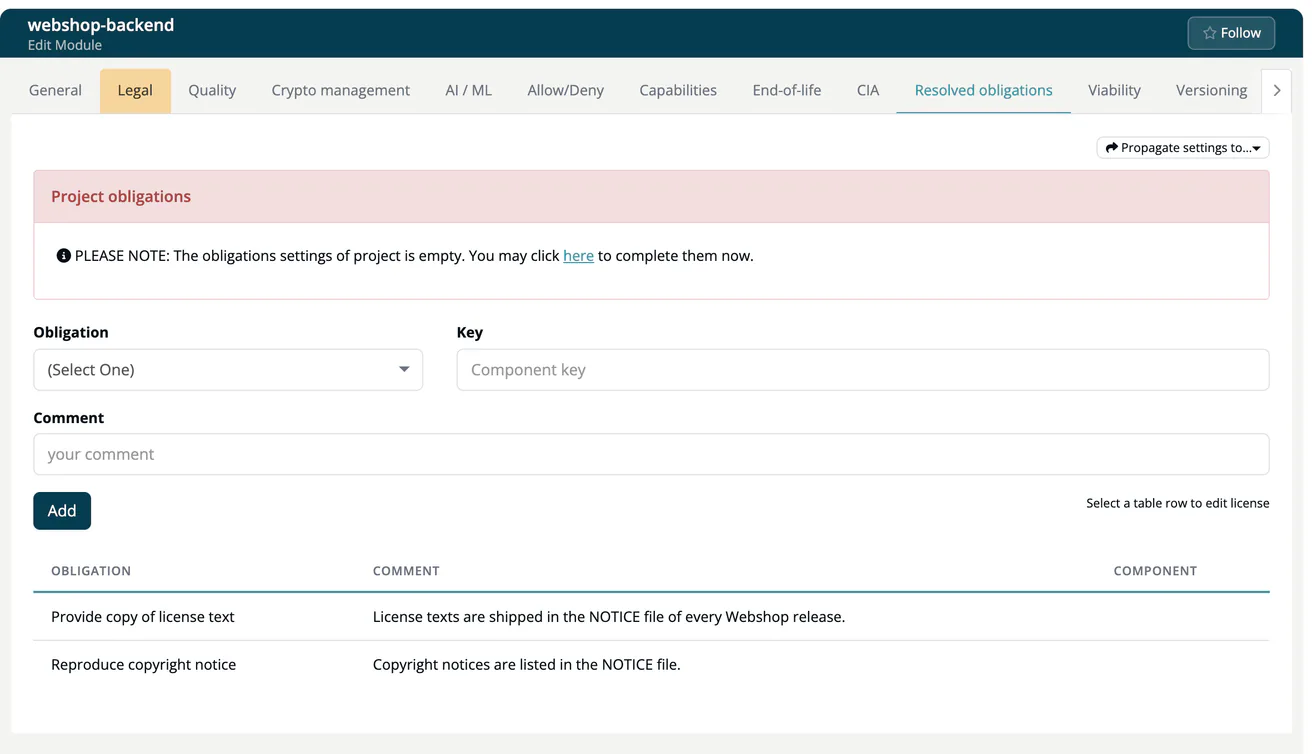
Resolved obligations (Module)
Note
Required role: Developer, Compliance manager, Portfolio manager and Manager see the tab. Editing, Import settings from Module and Propagate settings to... are for managers and compliance managers who are the module's default project manager or default compliance manager (or any of them while none is set). See the Module Settings Permission Matrix.
Use this tab to record which license obligations your team has already fulfilled in this module, for example the attribution notice for an Apache-2.0 library. Recorded obligations count as resolved. Which obligations exist at all follows from the Legal settings and the licenses of the components.
Project obligations
If the module belongs to a project, the panel Project obligations lists the obligations already completed on project level. It is read-only here. When the project has none yet, a red note links to the project, where you can complete them first.
Record a completed obligation
The list List of completed obligations of module has three columns: Obligation, Comment and Component.
- Select the Obligation.
- Optionally enter the Component key it was resolved for, for example
npm:left-pad. - Enter a comment of up to 200 characters (required), for example Notice added to THIRD-PARTY.txt in release 4.2.
- Click Add.
Click a row to change it: the button becomes Update, and Cancel and Remove appear.
Obligations can also be resolved per component with Resolve this obligation in the component side panel, and many are resolved by publishing a notice file (Resolve via Notice file in the module header).
Import and propagate
Both buttons are in the upper right of the tab.
- Import settings from Module: choose a module (type to search by name) and copy its list into this module.
- Propagate settings to...: push this module's list to one other module, All my n modules or All my n project modules. Portfolio managers also see All n modules and All n project modules. "My" modules are those where you are default project manager or default compliance manager.
Warning
Propagating replaces the obligation list of every target module.