Import Scans
Note
Required role: Developer, Compliance manager, Manager or Account admin. Creating a new project during the import needs Manager or Compliance manager.
Import Scans uploads an existing SBOM into TrustSource CE without a build pipeline. Use it for an SBOM from a supplier, a file from a local scanner, or data exported from another tool. The import creates a scan on a module, exactly as a CI/CD scan does, and the scan is analysed right away.
Import a file
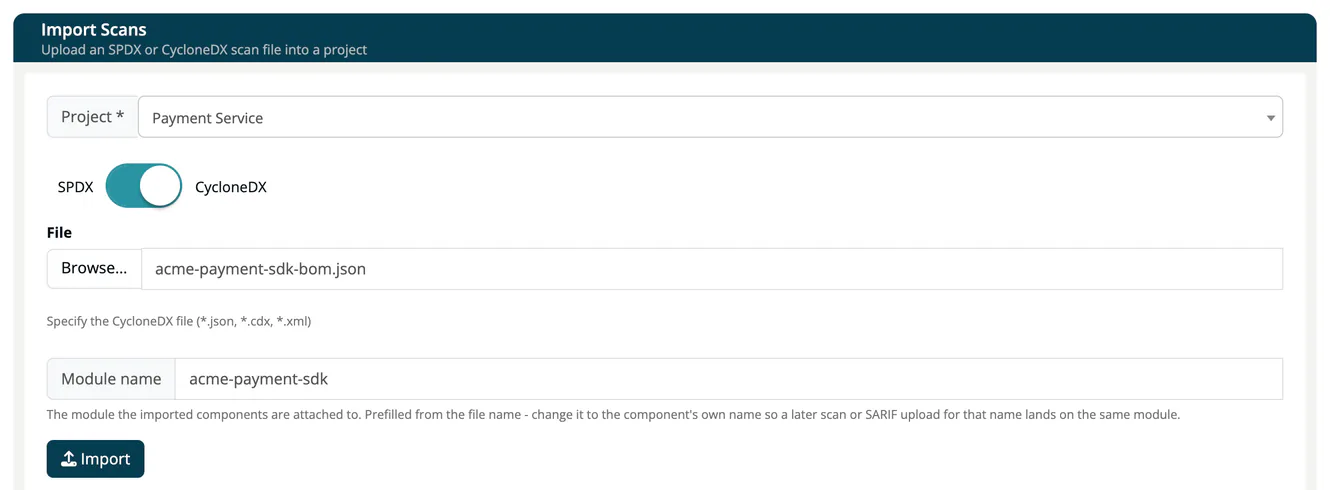
- Open Inbound (Scans) → Import Scans.
- Pick the Project. The field starts on + Create new project, which creates one for you (named New project, with a number added if the name is taken). Only a Manager or Compliance manager can create a project this way; a Developer must pick an existing project, otherwise the import ends with Access Denied.
- Set the switch to SPDX or CycloneDX.
- Press Browse... and select the file.
- Check the Module name. It is prefilled from the file name; change it to the component's own name, for example
nordwind-mobile-app, so a later scan or SARIF upload for that name lands on the same module. - Press Import.
The app reminds you that you may check the import status under Project settings → Imports and takes you to the project's modules. See Imports (Project); a failed import shows its reason there.
Supported files
| Switch | Accepted content | Notes |
|---|---|---|
| CycloneDX | CycloneDX JSON (.json, .cdx) |
Spec versions 1.2 to 1.7. |
| SPDX | SPDX JSON and SPDX RDF/XML (.json, .rdf, .xml) |
JSON and RDF/XML are told apart by the content, not by the file name. |
Warning
CycloneDX XML is not supported, even though the file picker lets you select an .xml file with the CycloneDX switch on. Such an import ends with the status ERROR and the reason 400 import file has invalid schema. Convert the file to CycloneDX JSON first. SPDX tag-value files are not supported either.
Files up to 10 MB can be imported in the web interface. Through the API a file upload may be up to 50 MB by default (setting TS_UPLOAD_MAX_MB, see Environment variables); a larger file is refused with 413.
What the import reads
- SPDX documents keep their dependency structure: the relationships that say what depends on or contains what are read, and a package mentioned in no relationship is still imported. The license the document declared is kept next to the license the app derives from it.
- CycloneDX components of the type cryptographic asset and machine learning model are attached to the components they belong to rather than shown as dependencies. They feed the module's crypto and AI / ML data.
- Dependency chains deeper than 40 levels continue as further top-level entries, so nothing is dropped.
- A file from which no component can be read is not imported: the import ends with 400 import file has no valid meta or components.
Module names
The module name decides where the data lands. TrustSource CE trims leading and trailing spaces, then matches the name exactly (no case folding) inside the project. If the module exists, the import adds a scan to it; otherwise it creates the module. A later scan or SARIF upload with the same name lands on the same module; see SW Quality Scans.
Skipped dependencies
One unusable dependency does not stop an import. An entry without a usable identifier, or one that cannot be processed, is skipped and the rest of the file is imported. The scan records how many entries were skipped and keeps the first 100 with their reason and position, and Audit logs show one Scan processed entry per scan, for example "12 dependencies skipped".
Import with the API
Send the same files to the import endpoints. The target project must already exist; project and module are passed as query parameters, the file as a multipart upload:
curl -X POST "https://<your-host>/api/v2/core/imports/scan/cyclonedx/json?projectName=Storefront&moduleName=nordwind-mobile-app" \
  -H "x-api-key: YOUR_API_KEY" \
  -F "file=@bom.json"
For SPDX use /core/imports/scan/spdx/json or /core/imports/scan/spdx/rdf. project and module are accepted as aliases of projectName and moduleName. An unknown project is answered with 404.
For SPDX RDF, give the file part its content type explicitly:
curl -X POST "https://<your-host>/api/v2/core/imports/scan/spdx/rdf?projectName=Storefront&moduleName=nordwind-mobile-app" \
  -H "x-api-key: YOUR_API_KEY" \
  -F "file=@sbom.rdf;type=application/rdf+xml"
Without ;type=application/rdf+xml, curl sends the file as application/octet-stream, which the app reads as JSON, and the upload is refused with 400.
Tip
If you import regularly, set up a scanner in your build pipeline so every build delivers its own scan. See CI/CD Scan.