CSAF
Note
Who can do what: - Create and import documents: Manager, Compliance manager, Company security manager, Account admin - Edit and delete drafts: Compliance manager, Company security manager, Account admin - Publish to the CSAF provider: Company security manager - Manage CSAF feed keys: Account admin
The Outbound menu itself is shown to Compliance manager, Manager and Account admin. A user who is only Company security manager opens the page at https://<your-host>/csaf.
CSAF (Common Security Advisory Framework) documents are machine-readable security advisories. TrustSource CE creates, imports and edits CSAF 2.0 documents, including VEX documents that state for each vulnerability whether your product is affected. It checks them against the CSAF 2.0 schema, publishes them to a CSAF provider you operate, and serves them to selected recipients through feed keys.
The CSAF list
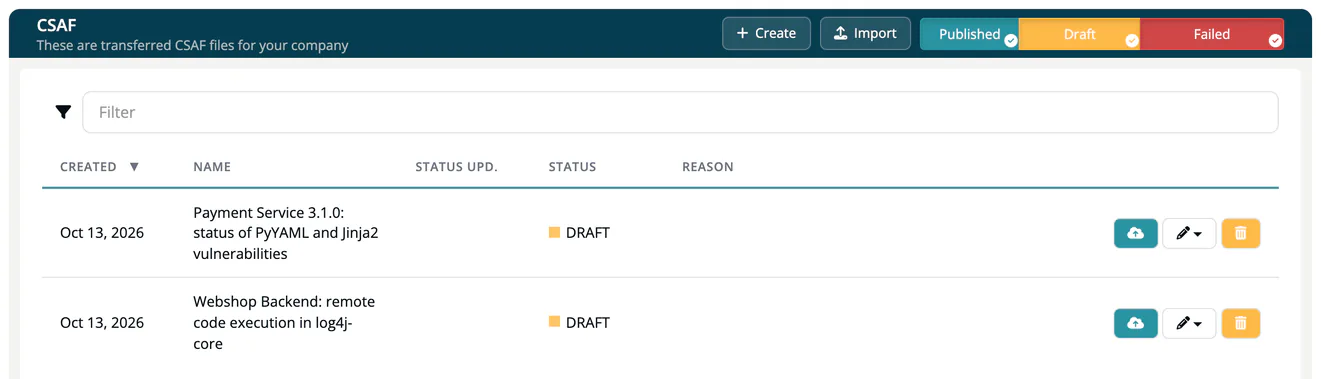
Open Outbound → CSAF. The page lists the CSAF files of your company.
| Column | Meaning |
|---|---|
| Created | When the document was created or imported. |
| Name | The published file name, or the document name while it is a draft. |
| Status upd. | When the status last changed. |
| Status | DRAFT, PUBLISHED or FAILED (publishing failed). |
| Reason | Why publishing failed. |
| (actions) | Publish (Company security manager), the edit menu (All fields, JSON, via "Create wizard") and delete (drafts only). |
The buttons Published, Draft and Failed show or hide each status. Click a row to open the document.
Create a document
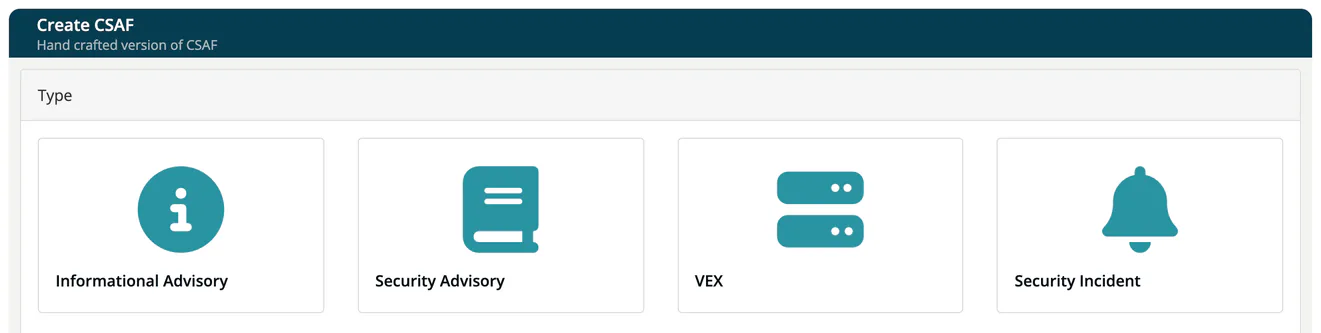
Create opens the wizard Create CSAF. Move with Previous and Next; Save stores the draft at any step.
- Type: Informational Advisory, Security Advisory, VEX or Security Incident.
- Meta: title, CSAF version (2.0), category, language, and the sections Document acknowledgments, Aggregate severity, Rules for sharing document (including the Label of TLP), Document notes, Publisher, Document references and Tracking.
- Affected: tick the affected Products or Modules.
- Vulnerabilities: search a vulnerability (for example
CVE-2021-33044) in the Vulnerability Lake and add it. - Remediations: per vulnerability, set the Product status (for example Known affected, Known not affected, Fixed) for the affected products and add remediations.
VEX documents are also created from vulnerability data:
- Export as CSAF on the New vulnerabilities tab of a release creates a VEX draft for the new vulnerabilities and downloads it.
- The vulnerability report can create a CSAF document from its findings.
Import a document
Import opens Import CSAF. Select a CSAF file (.json) and click Import. The file is checked against the CSAF 2.0 schema; an invalid file is refused with the validation messages. The import is stored as a draft.
Edit a document
The document page has the tabs Meta information, Affected (branches, full product names, product groups, relationships), Remediation, History and JSON. Each editing tab has Save and Discard. In JSON you edit the raw document. History lists the changes made to the document.
Publish to your CSAF provider
Publishing uploads the document to a CSAF provider (trusted provider directory) that you run next to TrustSource CE. The operator configures it with three environment variables; all three are required:
| Setting | Purpose |
|---|---|
TS_CSAF_PROVIDER_URL |
Base URL of the provider, http:// or https://. |
TS_CSAF_PROVIDER_PASSPHRASE |
Passphrase sent with each upload. |
TS_CSAF_PROVIDER_PASSWORD |
Password the provider authenticates the upload with. |
See Environment variables. Without them, Publish answers with CSAF provider is not configured and names every missing variable.
To publish:
- Click Publish (in the list or the document header).
- Enter a Summary of the revision; it is required.
- Confirm with Yes, publish it!
TrustSource CE then:
- adds a revision to the tracking history, increases the version and sets the current release date;
- on the first publish, assigns the tracking id
<prefix>-<year>-<number>, for exampletsvx-2026-00001(prefixes:tssasecurity advisory,tsvxVEX,tsiainformational advisory,tssisecurity incident); - checks the document against the CSAF 2.0 schema;
- uploads it to
<TS_CSAF_PROVIDER_URL>cgi-bin/provider/api/uploadand sets the document'sselfreference to<TS_CSAF_PROVIDER_URL>.well-known/csaf/white/<year>/<tracking id>.json.
The status becomes PUBLISHED; if the provider refuses the upload, FAILED with the reason. A published document can be updated with Publish updated version.
Warning
TrustSource CE always uploads to the provider's white (public) directory, whatever TLP label the document carries. Do not publish advisories that must stay restricted; hand them to recipients through feed keys instead.
A published document cannot be deleted. Publish a corrected version instead.
Delete a draft
The delete button (list) or Remove (document header) asks for confirmation in Remove CSAF. For VEX documents you can also:
- unmute the vulnerabilities covered in this document in the affected modules, and
- re-open risks from vulnerability assignment.
Share documents through feed keys
A CSAF feed key gives a recipient read access to your documents by TLP level, without a login. Create keys under Administration → API keys → CSAF feed keys: give each key a name and at least one TLP level (WHITE, GREEN, AMBER, RED). See CSAF feed keys.
| Request | Returns |
|---|---|
GET https://<your-host>/api/v2/compliance/csaf/{key}/documents |
The documents the key may read, newest published first: id, tracking id, title, category, TLP, publish date. |
GET https://<your-host>/api/v2/compliance/csaf/{key}/documents/{id} |
One document as CSAF JSON. |
What a recipient gets:
- Every document whose TLP label is one of the key's levels, drafts included, in its current state. A document without a TLP label is never served.
- A document the key may not read is answered with
404, the same as one that does not exist. An unknown or unpublished key gets404too. - Each read is counted on the key.
Warning
Because feed keys also serve drafts, keep unfinished advisories on a TLP level that no external key holds, or give recipients keys only for levels whose documents are ready.
VEX for releases
Every release has a CSAF VEX document that holders of its release key read from /api/v2/compliance/releases/{release_key}/csaf (all vulnerabilities) and /csaf-changes (changes since the release). These documents are generated on request, carry an HMAC integrity check that only your installation can verify, and are not stored in the CSAF list. See Public Approves.
Related
- Background: VEX in CSAF
- Products: products referenced in CSAF documents
- Vulnerability Lake
- Verify: check the signature of a release VEX