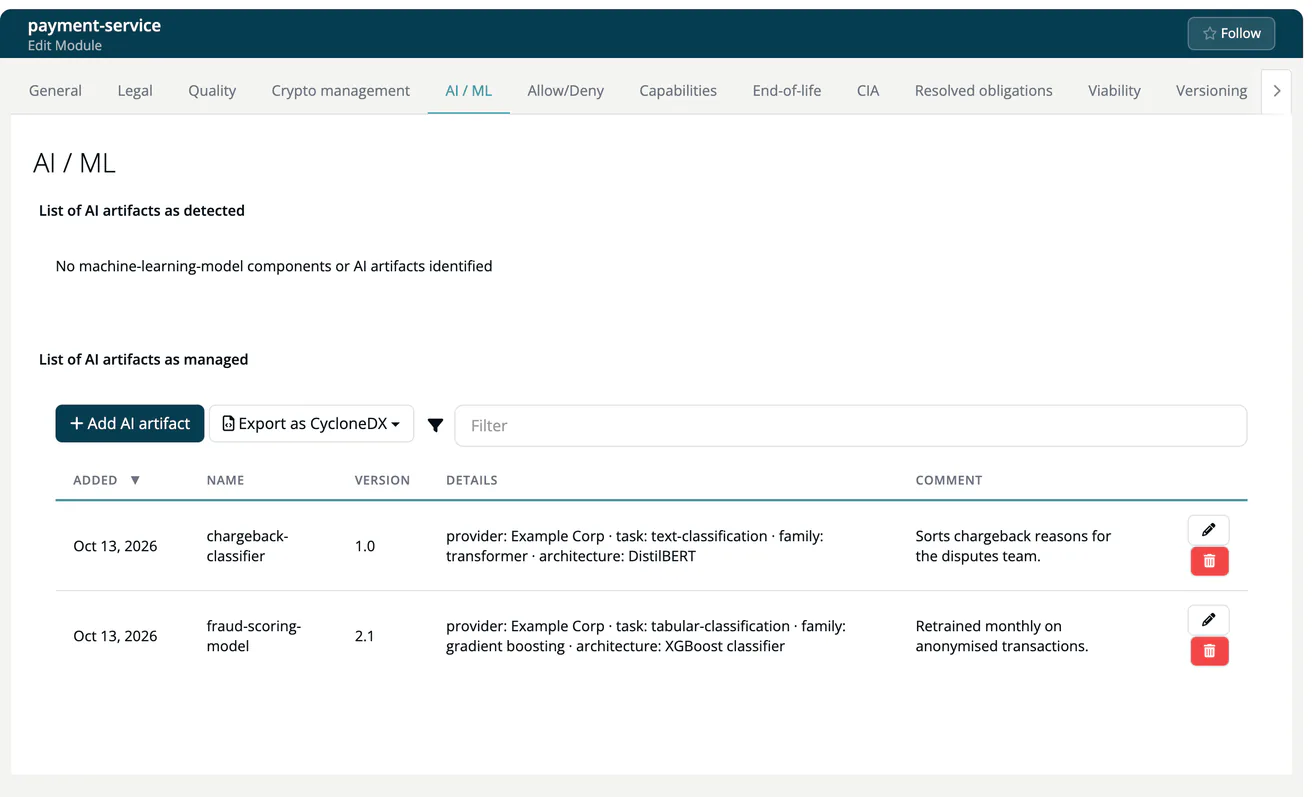
AI / ML (Module)
Note
Required role: the tab is shown to everyone who can read the module's Crypto management tab. Add AI artifact, edit, remove and Export as CycloneDX need Developer, Compliance manager or Manager. See the Module Settings Permission Matrix.
The AI / ML tab manages the AI artifacts of a module, the basis of its AIBOM (AI bill of materials). It has the same structure as Crypto management and sits next to it. It is not shown for infrastructure and COTS modules.
List of AI artifacts as detected
The upper panel lists the machine-learning models and AI artifacts found in the module's components, for example stable-diffusion-xl-base [1.0] · text-to-image. If there are none, it reads No machine-learning-model components or AI artifacts identified. Models arrive with a scan or a CycloneDX import.
List of AI artifacts as managed
The lower panel holds the artifacts you maintain by hand, in addition to what the scan found. Columns are Added, Name, Version, Details (provider, task, family, architecture) and Comment.
Click Add AI artifact (or the pencil on a row for Edit AI artifact), fill in the fields and click Save:
| Field | Example |
|---|---|
| Name (required) | stable-diffusion-xl-base |
| Version | 1.0 |
| Provider | Stability AI |
| Task | text-to-image |
| Model family | diffusion |
| Architecture | Stable Diffusion with Refiner |
| PURL | pkg:huggingface/stabilityai/stable-diffusion-xl-base-1.0 |
| Comment | optional note |
The bin icon removes an artifact.
Export as CycloneDX
Export as CycloneDX offers AIBOM (only the AI artifacts) and Full BOM (components + crypto + AI). Both download a CycloneDX JSON file. The same documents are available through the REST API, see Modules endpoints.
AI models also appear in the AI / ML models section of the component side panel; see Component details.