Check (License / Component)
Note
Required role: developer, compliance_manager, manager or account_admin
Check answers a "what if" question before you commit to a dependency: would this license, or this component version, pass the rules of a given module? It evaluates against the legal settings of a project and module of yours, but it adds nothing to them. Open it from Inbound → Check.
Two buttons in the header switch between the modes: License and Component.
Check a license
- Choose the Project and the Module whose rules apply.
- Choose the License.
- Press Check license.
The result shows the license name with a status colour and then, for the module's settings:
- whether the license is Whitelisted, Blacklisted or a Private license (always accepted);
- legal problems, for example a conflict with the module's distribution model;
- obligations that come with the license.
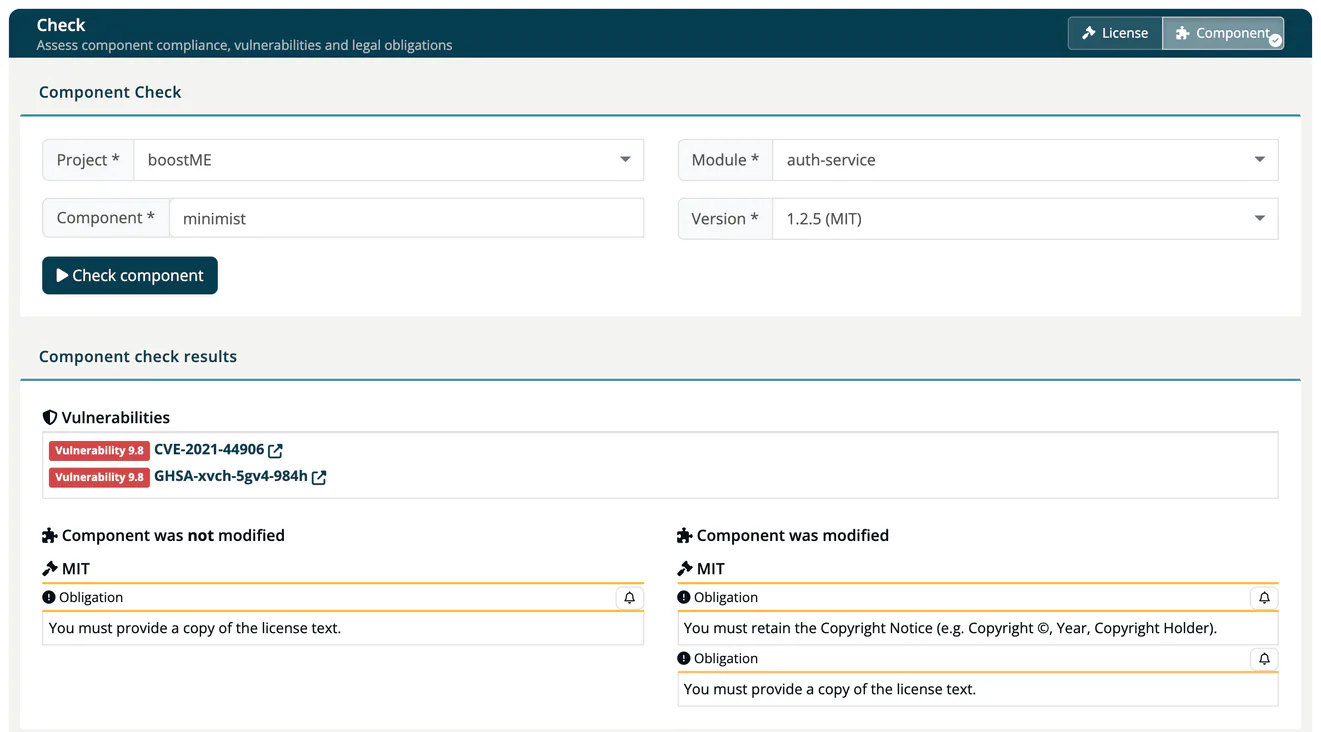
The result distinguishes "component was not modified" from "component was modified", because obligations differ.
Check a component
- Choose the Project and Module.
- Start typing in Component and pick a match from the suggestions.
- Choose the Version. The licenses of each version are shown next to it.
- Press Check component.
You get the Vulnerabilities known for that version (each linked, coloured by score, or "no vulnerabilities known") followed by the same legal assessment as above, based on the component's license.
When a project or module cannot be selected
If the project or module has incomplete legal settings, TrustSource says it cannot be selected and links to the settings to complete the legal requirements first. Until all required fields are chosen, the page lists what is missing.
Tip
A bell button next to a legal problem or obligation marks it as accepted or resolved, where it can be resolved by hand; the same button reopens it. For automation, the Check API offers the same evaluation.