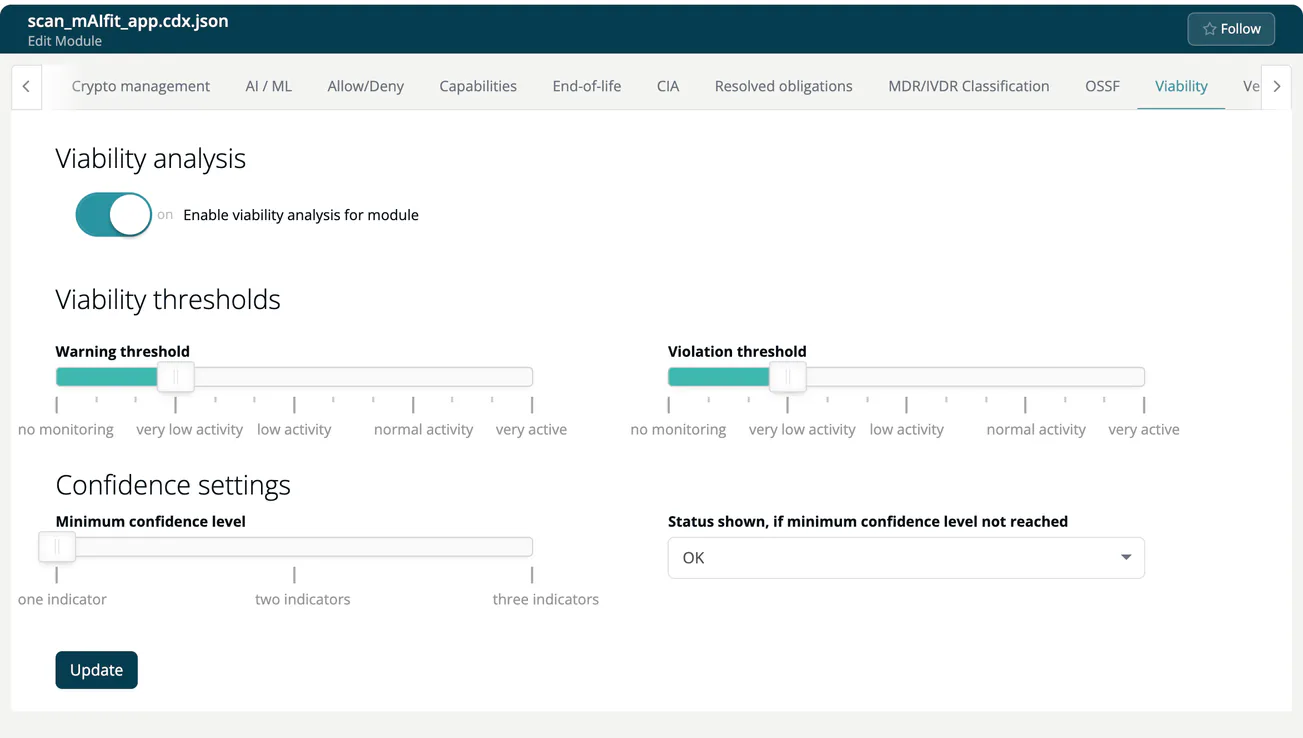
Viability (Module)
Note
Required role: everyone who can open the module settings reads the tab. Editing and Import settings from Module are for developers and for managers and compliance managers who are the module's default manager (or if none is set). Saving is also checked on the server, which accepts account admins, managers and compliance managers. See the Settings Permission Matrix.
Viability asks: is a component still alive? TrustSource rates each component by its repository activity (stars, forks, open issues, last update, commits during the last year) and turns the rating into OK, Warning or Violation. On this tab you decide where the lines are drawn for this module.
Switch it on
- Turn on Enable viability analysis for module.
- Confirm Are you sure you want to update Viability analysis settings? with Yes, update settings! The module is analysed again so that status and statistics follow the new setting.
Turning it off works the same way. The thresholds appear only while the switch is on.
Thresholds
| Setting | Scale |
|---|---|
| Warning threshold | no monitoring, very low activity, low activity, normal activity, very active |
| Violation threshold | same scale |
The warning threshold must not be lower than the violation threshold, unless it is no monitoring; otherwise the form shows 'Warning threshold' must not be lower than 'Violation threshold'.
Confidence
Activity data is not always complete. Two settings control how much evidence you demand:
- Minimum confidence level:
one indicator,two indicatorsorthree indicators. - Status shown, if minimum confidence level not reached:
OK,WarningorViolation.
A new module starts with both thresholds at very low activity, the minimum confidence at one indicator and the fallback status OK.
Click Update to save and re-analyse the module. A toast confirms Viability settings changed!.
Import from another module
Import settings from Module (upper right, with a search box) copies the viability settings of another module that has valid ones. A toast confirms Viability settings copied from module: ….
Tip
To see the result across a project, open the Viability report from the project's Reports menu. See Analysis Reports.