Skip to content

Settings Permission Matrix

Field-level permissions for the project settings tabs of TrustSource CE. Which role may read, edit or run what in a tab depends on the role and, for Managers and Compliance managers, on the relationship to the project. The module settings are on the next page.

Note

The tables are generated from the permission definitions of TrustSource CE 1.0 (imports/lib/userExtUtils.js, summarised in ROLES_AND_PERMISSIONS.md of the source repository). They control what the interface shows: a tab appears only when you have r on at least one of its settings; a field is editable only with w. The server checks role and company only, so the default-owner and member contexts are not a security boundary in TrustSource CE 1.0. See Permission Model.

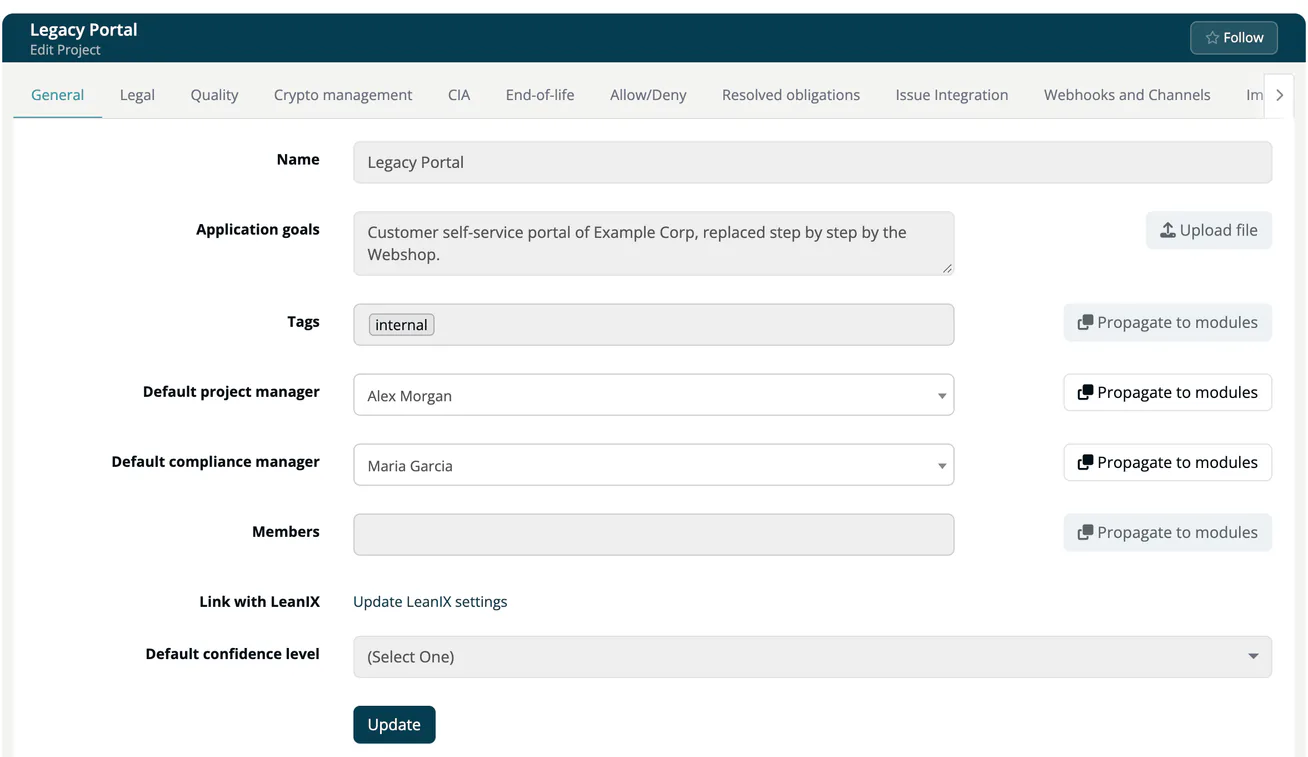
The project settings of Legacy Portal for Chris Taylor, who is not an owner: read-only Name, Application goals, Tags and Members fields, and editable Default project manager and Default compliance manager fields.

How to read the tables

Every setting carries a rights code: a combination of these letters.

Code Capability Meaning
r view You can see the setting.
w edit You can change the value.
x run You can run an action on it, such as import, propagate, export or delete.
d delete You can delete entries.

Codes combine: rw = view and edit, rwd = view, edit and delete, rx = view and run. - means the setting exists but the role has no access.

Column headings use these abbreviations:

Abbreviation Role
Dev Developer
CM Compliance manager
PM Portfolio manager
Mgr Manager
AA Account admin
CCM Company component manager
CSM Company security manager

Roles are combined with OR: if any of your roles grants a right, you have it. Setting names are the technical names used by the app.

Project settings: base rights

Each heading is a tab in the project settings. The Webhooks and Channels tab has no field rights: it is shown to everyone, and creating or removing a receiver needs Account admin, Manager or Compliance manager.

General

Setting Dev CM PM Mgr AA CCM CSM
name r r r r r r r
description r r r r r r r
tags r r r r r r r
leanix r r r r rw r r
relatedUsers › defaultProjectManager r r rw r r r r
relatedUsers › defaultComplianceManager r r rw r r r r
relatedUsers › members r r r r r r r
Setting Dev CM PM Mgr AA CCM CSM
settings r r r r r r r
wizard - - - - - - -
import_template - - - - - - -
import - - - - - - -
propagate - - - - - - -

Resolved obligations

Setting Dev CM PM Mgr AA CCM CSM
list r r r r r r r
import - - - - - - -
propagate - - - - - - -

CIA

Setting Dev CM PM Mgr AA CCM CSM
settings r r r r r r rw
import - - - - - - rx

Crypto management

Setting Dev CM PM Mgr AA CCM CSM
settings r r r r r r r
import - - - - - - -

End-of-life

Setting Dev CM PM Mgr AA CCM CSM
settings r r r r r r r
import - - - - - - -

Quality

Setting Dev CM PM Mgr AA CCM CSM
settings r r r r r r r
import - - - - - - -

Allow/Deny

Setting Dev CM PM Mgr AA CCM CSM
enforce r rw r r r r r
whitelist_license_approve - rx - - - - -
whitelist_license r rw r r r r r
whitelist_component_approve - rx - - - - -
whitelist_component r rw r r r r r
blacklist_license r rw r r r r r
blacklist_component r rw r r r r r

Issue Integration

Setting Dev CM PM Mgr AA CCM CSM
switch r r r r rw - -
project r r r r rw - -
jira › switch r r r r rw - -
jira › settings r r r r rw - -
jira › active r r r r rw - -
tfs › settings r r r r rw - -
tfs › active r r r r rw - -
github › settings r r r r rw - -
github › active r r r r rw - -

Imports

Setting Dev CM PM Mgr AA CCM CSM
import r r r r - - -

Danger Operations

Setting Dev CM PM Mgr AA CCM CSM
delete - - - - - - -

Note

The permission definitions also contain a capabilities group for projects (CSM rw/rx, all others r). The project settings have no Capabilities tab, so it has no effect; capabilities are set on modules.

Rights that depend on your relationship to the project

The tables above show the base rights. In the interface, Managers and Compliance managers get different rights depending on how they relate to the project (the server does not check this relationship):

Context When it applies
Default owner The Manager is the default project manager of the project, or the Compliance manager is its default compliance manager, or no such default is assigned.

The Developer's member and non-member contexts do not change any project setting. All other roles always have their base rights.

The next tables list only settings where a context differs from the base.
Context rights: General

Setting CM base CM default owner Mgr base Mgr default owner
name r rw r rw
description r rw r rw
tags r rw r rw
leanix r r r rw
relatedUsers › defaultProjectManager r rw r rw
relatedUsers › defaultComplianceManager r rw r rw
relatedUsers › members r rw r rw
Setting CM base CM default owner Mgr base Mgr default owner
settings r rw r rw
wizard - rx - rx
import_template - rx - rx
import - rx - rx
propagate - rx - rx

Context rights: Resolved obligations

Setting CM base CM default owner Mgr base Mgr default owner
list r rw r rw
import - rx - rx
propagate - rx - rx

Context rights: CIA, Crypto management, End-of-life, Quality

The same values apply to each of these tabs.

Setting CM base CM default owner Mgr base Mgr default owner
settings r r r rw
import - - - rx

Context rights: Allow/Deny

Setting CM base CM default owner Mgr base Mgr default owner
enforce rw rw r rw
whitelist_license_approve rx rx - rx
whitelist_license rw rw r rw
whitelist_component_approve rx rx - rx
whitelist_component rw rw r rw
blacklist_license rw rw r rw
blacklist_component rw rw r rw

Context rights: Issue Integration

Every setting of the tab (switch, project, jira › switch, jira › settings, jira › active, tfs › settings, tfs › active, github › settings, github › active):

CM base CM default owner Mgr base Mgr default owner
r r r rw

Context rights: Imports

Setting CM base CM default owner Mgr base Mgr default owner
import r rx r rx

Context rights: Danger Operations

Setting CM base CM default owner Mgr base Mgr default owner
delete - - - rx