Tab: Information
Note
Required license feature: products
Editing: developer, compliance_manager, company_security_manager or account_admin. Retire / Revert: compliance_manager, company_security_manager or account_admin.
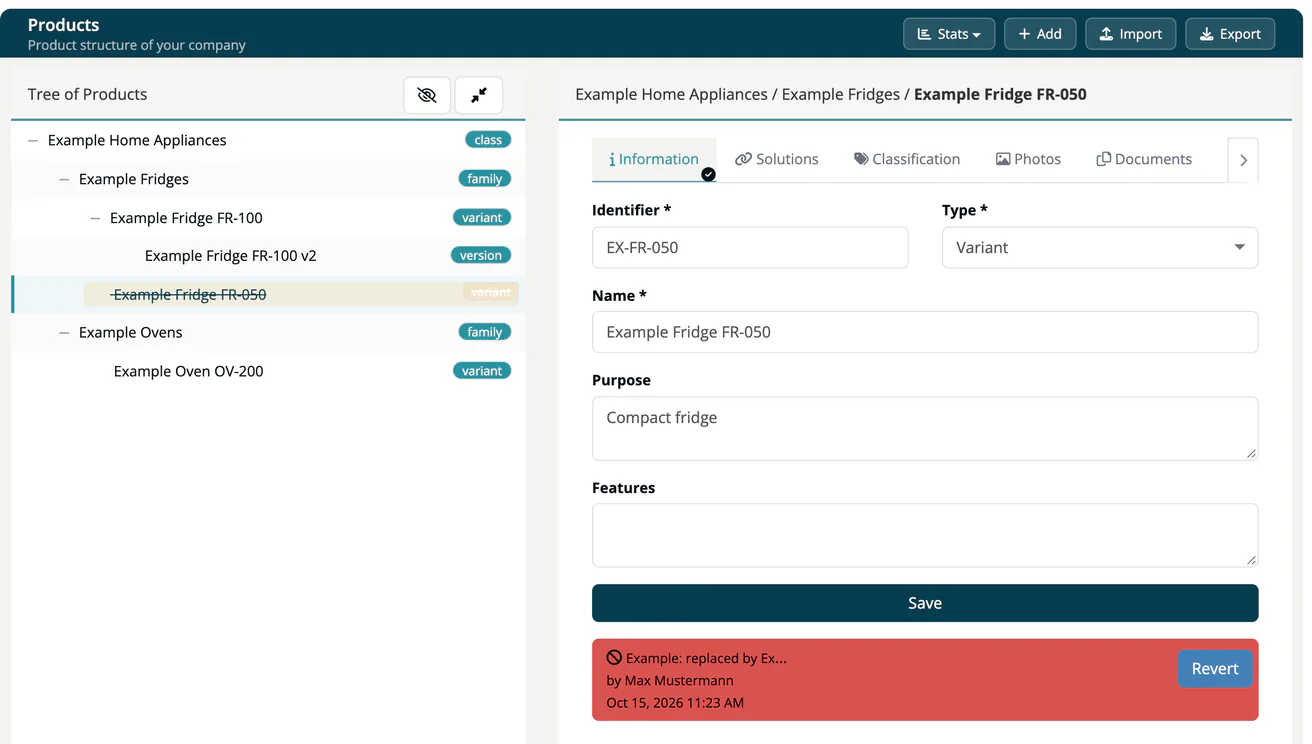
The Information tab holds the basic data of a product. The heading above the tabs shows the path through the tree (for example Fridges / Dual-sided) and a Draft label for draft products.
Fields
| Field | Description |
|---|---|
| Identifier * | Your unique key for the product, for example FR-100. Must not be used by another product. |
| Type * | Class, Family, Variant, Version or Position. |
| Name * | Display name in the tree. |
| Purpose | What the product is for. |
| Features | Free text listing the product's features. |
Click Save. If the identifier is already taken, TrustSource shows "Error: product with same identifier already exists" and keeps the old data.
Note
Changing the identifier keeps the product selected, but the parent link of existing sub-products still refers to the old identifier. Prefer to keep identifiers stable.
Retire and revert
A product that is no longer sold should be retired rather than deleted: its history stays.
- Click Retire (top right of the form).
- Enter a reason (it is mandatory) and confirm with Yes, retire it!.
A retired product disappears from the tree (use Show all to see it), is excluded from exports, and shows the reason, the user and the date in the tab.
To bring it back, click Revert, enter a reason and confirm with Yes, revert action!. The last reason and user stay visible after a revert.
Note
Retiring a product does not retire its sub-products.
Related
- Products overview - all eight product tabs