Issue Integration (Project)
Note
Required role: developer, compliance_manager, portfolio_manager, manager and account_admin see the tab. account_admin, and manager users who are the project's default project manager (or any manager while none is set) can change it.
Required plan: a project-level integration needs a plan that includes it. Otherwise the tab shows a note that an enterprise account type is needed, and the fields are disabled.
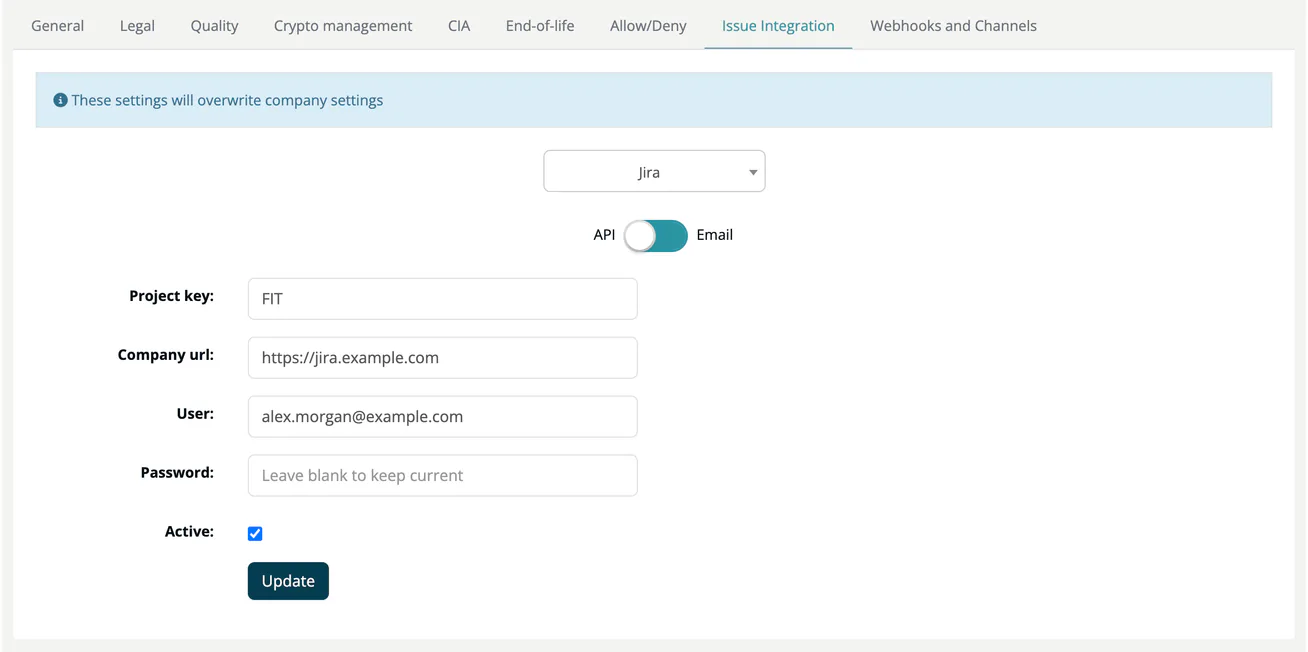
The Issue Integration tab configures where TrustSource creates issues for this project: in TFS (Azure DevOps), Jira or GitHub. The info line These settings will overwrite company settings reminds you that the project values take precedence over the company integration under Issue Trackers.
Choose the tracker
Select the tracker in the list at the top: TFS, Jira or GitHub issues. The tab opens on the tracker that is active for the project.
Fields
| Tracker | Fields |
|---|---|
| TFS (Azure DevOps) | Account or URL, Project, Access Token, Active. |
| Jira | Switch API / Email. API: Project key, Company url, User, Password, Active. Email: Project key, Email address (the receiver address of your Jira email handler), Active. |
| GitHub issues | Access Token (required), Repository (optional), Active (required). |
Password and token fields stay empty after saving; leave them blank to keep the stored value. Click Update to save.
Tip
Store credentials as API tokens rather than passwords where possible. Jira Cloud requires an API token; a GitHub token needs permission to create issues in the repository.
Related
- Issue Trackers: company-wide configuration
- Integrations
- SW Quality Scans: creating issues from test findings