SBOM + CBOM
Note
Required role: compliance_manager, manager or account_admin (the Outbound menu). Creating a file also works for developer; editing, versioning and freezing need compliance_manager or manager.
TrustSource keeps SBOM files: editable bills of materials for a project or a module. From one SBOM file you download the Software Bill of Materials, the Cryptography Bill of Materials (CBOM) and the AI / ML Bill of Materials (AIBOM). Open Outbound → SBOM + CBOM.
The SBOM files list
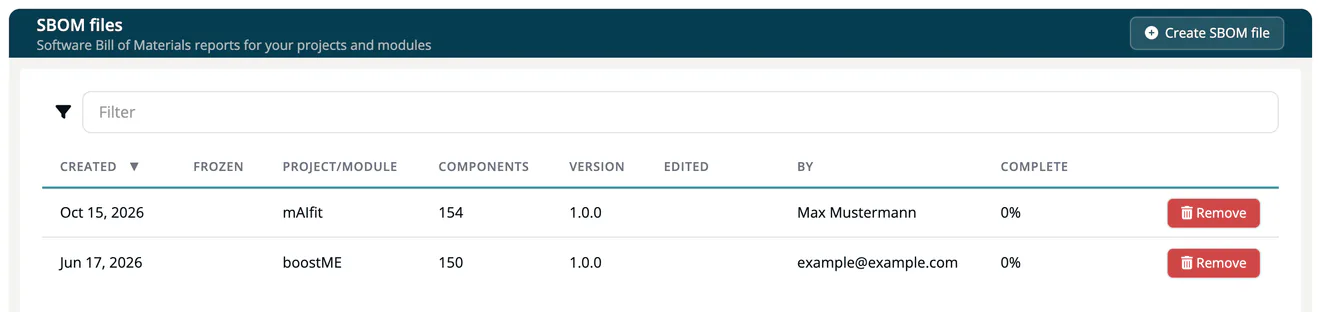
The page SBOM files lists every SBOM file of your company, including the ones created by approvals.
| Column | Meaning |
|---|---|
| Created | When the file was created. |
| Frozen | When it was frozen, if it was. |
| Project/Module | What the file describes. |
| Components | Number of components. |
| Version | Version of the file. |
| Edited, By | Last change and who made it. |
| Complete | How many components are cleared, in percent. |
| (last column) | Remove. |
Create an SBOM file
- Click Create SBOM file.
- Choose the Project or module: All module of ... for a whole project, or one module.
- Click Create SBOM file.
The file is built from the current analyses. An approval creates an SBOM file for its release in the same way.
Work on an SBOM file
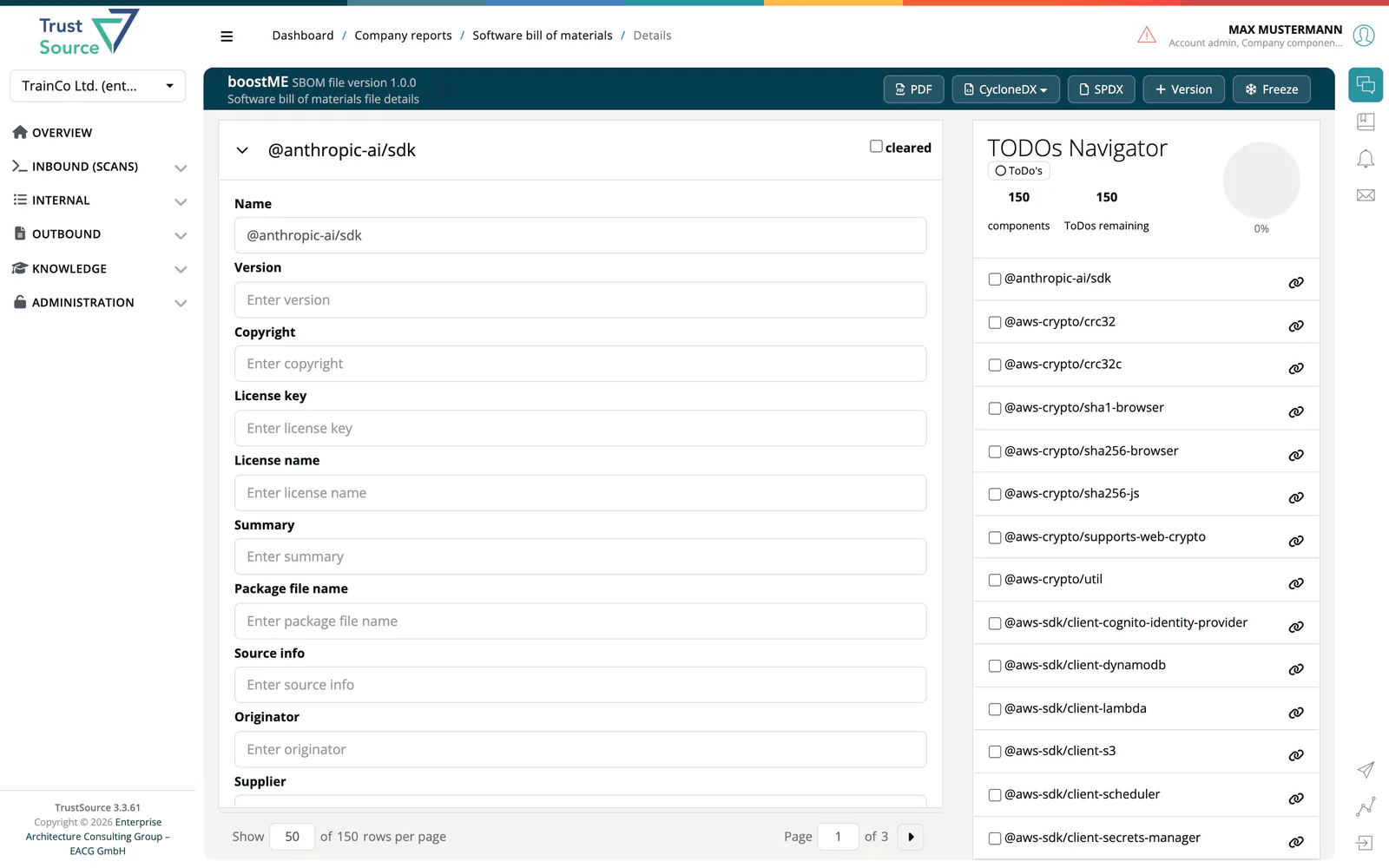
Click a row to open the file. The left side lists the components; open one to edit its fields: Name, Version, Copyright, License key, License name, Summary, Package file name, Source info, Originator, Supplier, Download location, Hash of executable, Homepage url, Repo url, Source url, Hash of source, Binary url, Other. Save component stores the changes. Tick cleared once a component is reviewed.
The TODOs Navigator on the right counts components and remaining ToDos, shows the completion in percent, and jumps to a component. ToDo's / Show all switches between open and all components.
Versions and freezing
- Version increments the version of the file (dialog Increment version, Save version).
- Freeze locks the file after a confirmation. A frozen file cannot be changed; the header then shows Frozen with the date.
If the project or module of a file was removed, the file is marked DEPRECATED.
Download
| Button | Format |
|---|---|
| A PDF report of the file, with your company logo (Company logo url under Account & Billing). | |
| CycloneDX → SBOM (components) | CycloneDX JSON with the components. |
| CycloneDX → CBOM (cryptography) | CycloneDX JSON with the cryptographic assets. |
| CycloneDX → AIBOM (AI / ML) | CycloneDX JSON with the AI / ML models. |
| CycloneDX → Full BOM (components + crypto + AI) | All of the above in one CycloneDX JSON document. |
| SPDX | SPDX JSON (.spdx.json). |
SPDX tag-value, SPDX RDF/XML and CycloneDX XML are not offered here. An SPDX RDF export of one module is available in the module settings (see Export SPDX), and external parties read the SBOM of a release through its release key (see Public Approves).
Related
- Import Scans - how component data enters
- Approvals - SBOM files of releases
- Background: SBOM Formats - SPDX vs CycloneDX comparison