Tab: Photos
Note
Required license feature: products
Editing: developer, compliance_manager, company_security_manager or account_admin
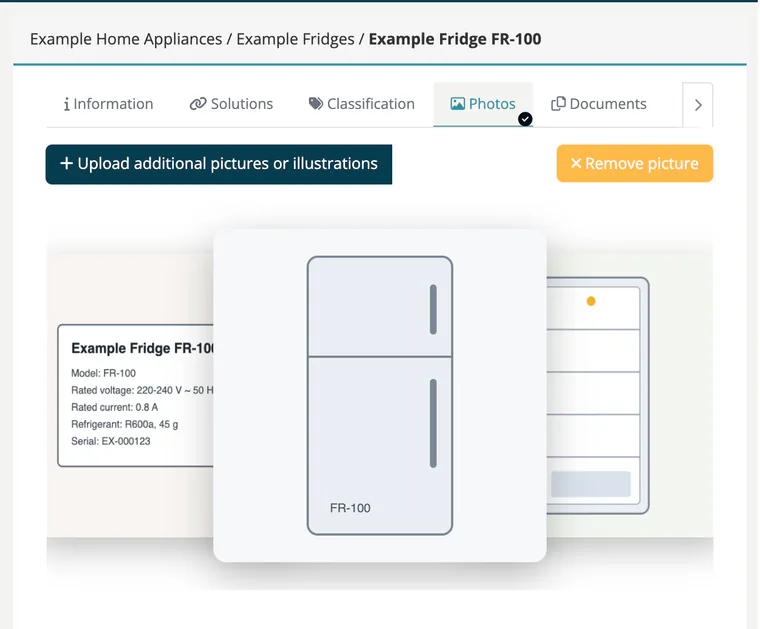
The Photos tab is a gallery of pictures and illustrations of the product, useful for identification and regulatory documentation.
Upload a picture
- Click Upload additional pictures or illustrations.
- Select an image. Accepted formats: JPG, JPEG, PNG, WEBP, GIF, AVIF, SVG, HEIC and HEIF.
The upload starts immediately (the button shows Updating product meanwhile) and the picture appears in the gallery. Other file types are rejected with "Invalid file type. Please upload a valid image."
Browse and remove
Use the gallery to page through the pictures: click a picture, or focus the gallery and use the left and right arrow keys, to bring it to the front. To delete the picture in front, click Remove picture; it is removed at once, without a confirmation. The button is visible once at least one picture exists.
Each picture stores who uploaded it and when. Photos can be downloaded together with the product documents; see Documents.
Related
- Products overview - all eight product tabs