Recipe: Share an SBOM Publicly
Give a customer, an authority or the public a stable link to the SBOM, notice file and CSAF VEX of a release, without a TrustSource CE login.
Note
You'll need:
- An approved release (see Your first module: from scan to signed-off SBOM).
- The role Account admin for the release keys page under Administration, or Manager or Compliance manager to create keys from the release itself.
- Your installation reachable from where the recipients are, over HTTPS. The links use the address set in
ROOT_URL. See HTTPS and reverse proxy.
How it works
A release key is a secret in the URL that gives read access to the documents of one release. Anyone who has the link can read what the key serves; nobody else can. You can unpublish the key at any time, and every request is counted.
Steps
1. Create a release key
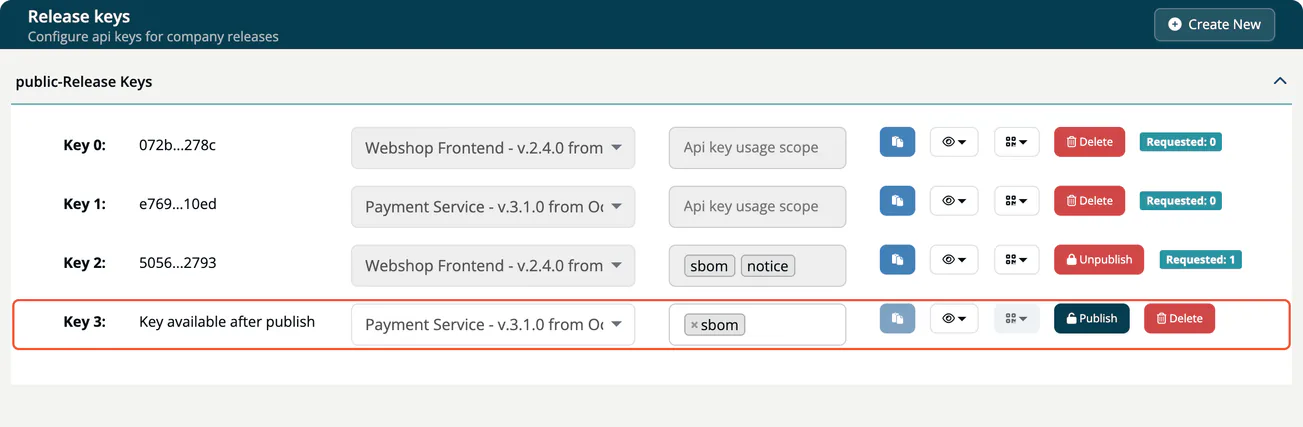
As Account admin, open Administration → API keys → Release keys and select Create New. Create New is available once at least one approved release exists.
As Manager or Compliance manager, open the release under Internal → Releases and select Published keys → Create new key. The Release keys page under Administration is open to the Account admin only.
2. Choose the release and the documents
In the new key's row, pick the release (shown as name, version and approval date) and the documents the key may serve:
| Value | Document |
|---|---|
sbom |
The release SBOM, signed |
notice |
The notice file with licenses, components and copyrights, signed |
csaf |
The CSAF VEX of the release, and the VEX of changes since the approval, signed |
Leave the selection empty to serve all three. Use the preview button to check each document before you publish.
3. Publish
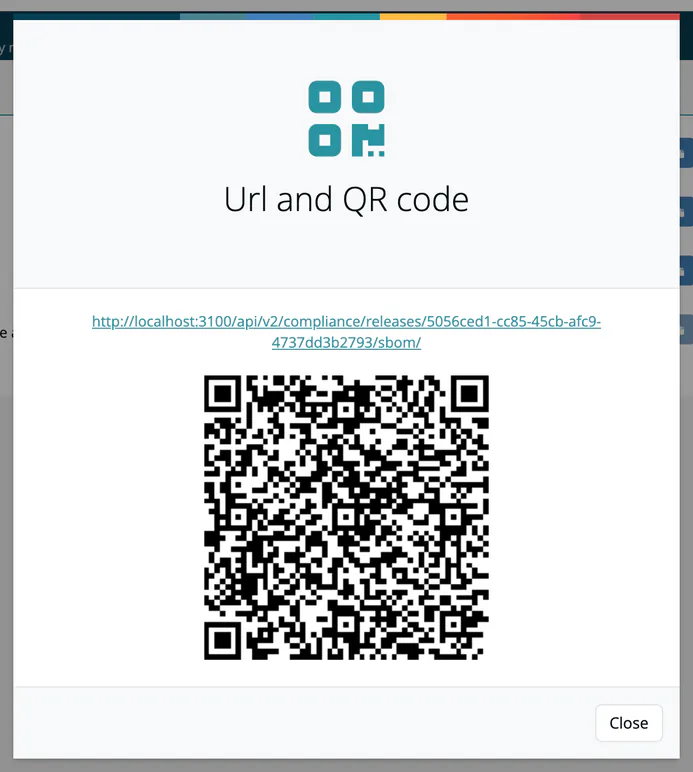
Select Publish. The release and scopes are now fixed for this key. The key can be copied, and the QR code button shows the URL and a QR code for SBOM, Notice and CSAF:
https://<your-host>/api/v2/compliance/releases/<release_key>/sbom
https://<your-host>/api/v2/compliance/releases/<release_key>/notice
https://<your-host>/api/v2/compliance/releases/<release_key>/csaf
4. Share and monitor
Send the URL to the recipient, or print the QR code on the device or its documentation. Requested next to the key shows how often it was used.
The documents carry signatures computed with your installation's TS_ENCRYPTION_KEY. These are integrity checks (HMAC), not public signatures: only the installation that issued a document can check it. A signed-in user of your installation checks a document under Outbound → Verify; recipients without an account cannot verify it themselves. See Verify.
5. Withdraw access
Select Unpublish (shown when the key has been used) or Delete (when it has not). An unpublished key answers 404; you can publish it again later.
Did it work?
- [ ]
curl https://<your-host>/api/v2/compliance/releases/<release_key>/sbomreturns JSON withcomponentsandsignatures. - [ ] After a request, Requested shows a count of at least 1.
Variants
- Share advisories rather than one release: create a CSAF feed key under Administration → API keys → CSAF feed keys. It serves all your CSAF documents of the chosen TLP levels, drafts included, so keep unfinished advisories on a TLP level that no external key holds. See CSAF feed keys.
- Share a file: download the SBOM as CycloneDX, SPDX or PDF from the release's SBOM page and send the file.