Functions by Role
What each role can do, one role at a time. Use it to decide which roles a person needs. Menu details are on Functions by Area; field-level rights in project and module settings are in the Settings Permission Matrix.
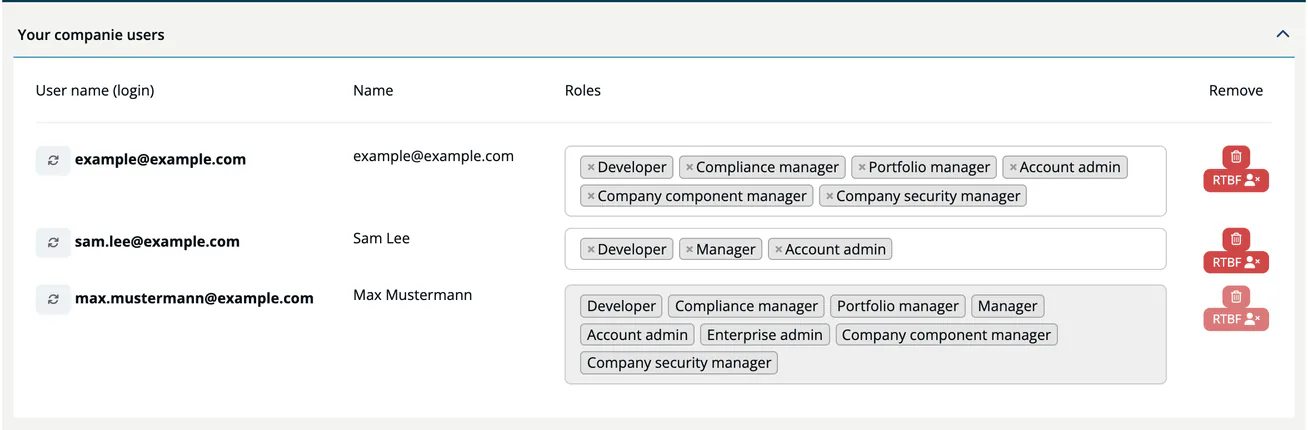
Roles add up: a person with several roles can do everything any of them can do. License flags and account types can hide entries on top of that.
Developer (developer)
- Menu: Overview, Inbound (Check, Import Scans, CI/CD Scan, SW Quality Scans with
sarif), Internal (Projects, Reports, Releases, Products withproducts, Risks withrisks, Threat Models withthreat), Knowledge. - Module settings: edit General (name, version, description, project id, tags), Viability, OSSF, Versioning, MDR/IVDR classification, CIA, Capabilities, Crypto management, Quality, Allow/Deny lists, Allowed vulnerabilities and Custom components (add only); export SPDX; delete a module and its history.
- Project settings: read only.
- Context: the member and non-member rights in the module matrix apply.
Compliance manager (compliance_manager)
- Menu: everything a developer sees, plus Approvals, Outbound (SBOM + CBOM, Notice Files, Verify, SOUP Lists, CSAF, CVD cases with the matching license), Mass Scans.
- Approvals: start and approve or reject approvals. See Approve / Reject.
- Project settings: edit Allow/Deny lists, enforce them and approve license and component allow-list entries.
- Company settings: Settings cards for FOSS liaison, Written offer, License allow/deny, Component allow/deny, Encryption, Quality, Company tags, Private licenses and Legal templates; Policies including the Opensource policy; the Login history page.
- Context: gets default-owner rights on projects and modules where they are the default compliance manager or none is set.
Portfolio manager (portfolio_manager)
- Menu: Overview, Knowledge, Settings with Company tags.
- Project and module settings: edit Capabilities; export SPDX.
- Visibility: sees every project and module of the company, also those whose members do not include them. See Permission Model.
Manager (manager)
- Menu: Inbound, Internal with Approvals, Outbound, Knowledge, Settings with Company tags.
- Approvals: start approvals and remove open requests. The Approve and Reject buttons are shown to compliance managers only.
- Company data: the Login history page; add, remove and import company tags; create and read webhooks and channels; change roles and remove users on the server side, although the User Management page itself is for account admins.
- Project and module settings: read only, plus Capabilities and SPDX export on modules.
- Context: gets default-owner rights, which are broad, on projects and modules where they are the default project manager or none is set. These include editing nearly every tab, running imports and deleting the project or module. See the project matrix.
Account admin (account_admin)
- Menu: Inbound, Internal (Projects, Reports, Releases, Products, Risks, Threat Models with their licenses), Outbound and the whole Administration section: Account & Billing, Identity Integration (Enterprise or Medical), Integrations, Settings, User Management, API keys, Policies, Audit logs.
- Company data: invite users, change roles, import users, remove users; manage integrations, webhooks and API keys; all Settings cards.
- Project settings: Issue Integration (Jira, TFS, GitHub) and the LeanIX link; read access elsewhere.
Enterprise admin (enterprise_admin)
- Menu: Overview, Knowledge, Account & Billing, Integrations, Enterprise Companies (Enterprise or Medical).
- Project and module settings: read only.
Company component manager (company_component_manager)
- Menu: Overview, Knowledge, Inbound (Repository Scans only), Settings with Component allow/deny and Manual vulnerability.
- Pages: the critical components report.
Company security manager (company_security_manager)
- Menu: Overview, Knowledge, Settings with PSIRT contacts, Component allow/deny, Encryption, Quality, Company tags, Private algorithms and Manual vulnerability; Policies with Crypto algorithms, Component end-of-life and Risk assessment.
- Project and module settings: edit CIA and Capabilities and run their imports.
- Pages: vulnerability activity.
Licence-bound role
| Role | Gives access to |
|---|---|
cvd_coordinator |
Nothing inside the app; it is passed on to the CVD service. Needs license cvdself. |
See Licence-bound role.
Approvals
- Start an approval (or turn a draft into one):
manager,compliance_manager. Other members get a403and nothing is saved. - Save a draft approval: any member.
- Approve / reject:
compliance_managerin the app (the buttons are shown to this role only); through the REST API, a key with thecompliance_managerscope.