Public Approves
Note
Required role: compliance_manager to approve. Managing release keys needs compliance_manager, manager or account_admin.
Public approves let you share the documents of an approved release with external stakeholders (customers, auditors, partners) without giving them a TrustSource login or an API key.
How it works
- Approve the request. See Approve / Reject.
- TrustSource creates a published release key for the approval automatically. While that key serves the approval, approving the same request again does not add a second key.
- Give the key to the external party, or ship it with your product. They fetch the SBOM, the notice file and the CSAF document under
https://api.trustsource.io/v2/compliance/releases/{release_key}/....
You do not have to mark an approval as public.
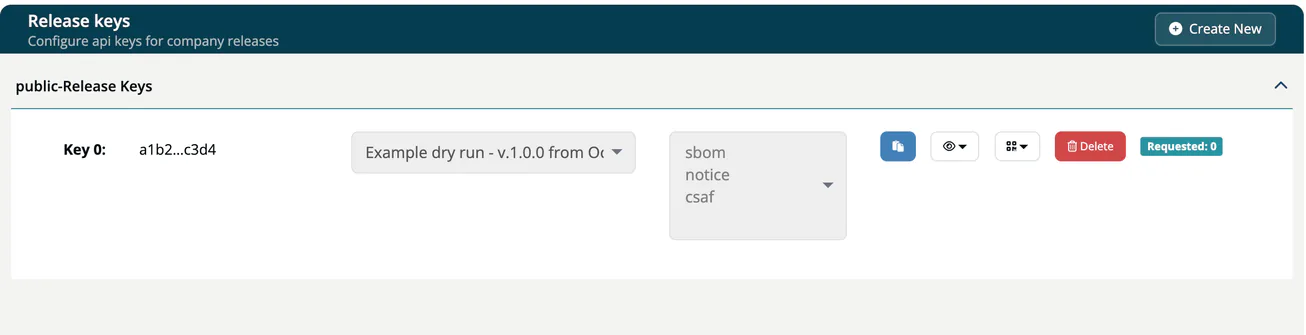
To see the keys of a release, copy, publish, unpublish or delete one, or create another one, click Published keys on the release. To limit what a key serves, change its scope, show its URL as a QR code, or take it offline, open Administration → API keys → Release keys. The API keys menu entry is shown to account_admin only. See Release keys.
The Packageurl you enter in the approval wizard is stored with the approval and identifies the release for the public vulnerability exchange (VEX).
This is useful for CRA compliance: you can provide customers with proof of your software composition without exposing your internal tooling.
Caution
Anyone who holds the key can read what it serves. Treat it like a password.
Related
- Approve / Reject: finalizing the approval
- Release keys: scope, URL and QR code of a key
- REST API → Public Routes: the routes behind release keys