End-of-life (Project)
Note
Required role: everyone who can open the project settings reads the tab. Managers who are the project's default project manager or default compliance manager (or any manager while none is set) can change it. See the Settings Permission Matrix.
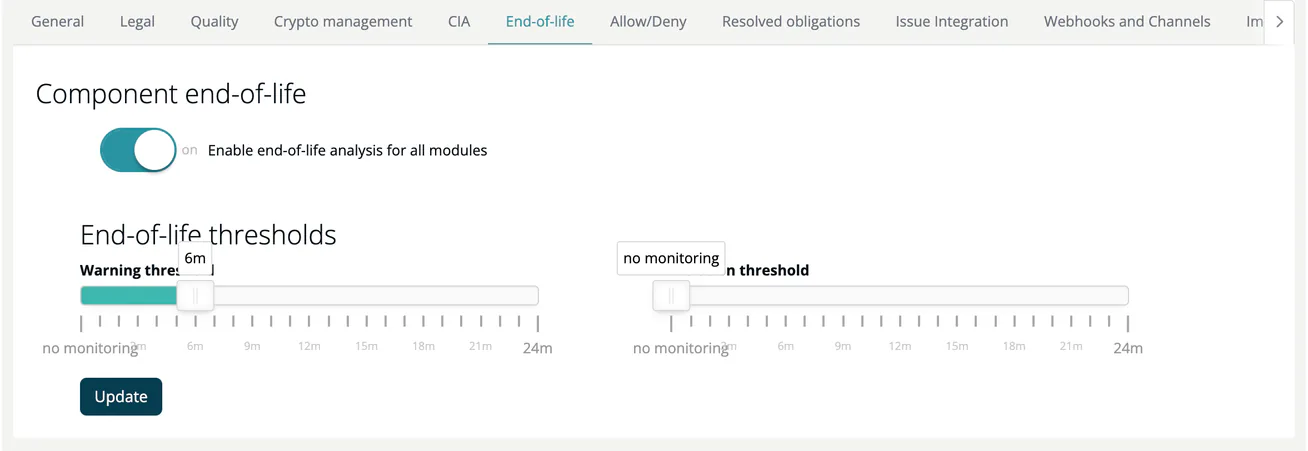
The End-of-life tab (heading Component end-of-life) controls when TrustSource CE flags components of this project that are close to or past their end of life, for example a debian:11 base image or a Node.js 16 runtime.
Steps
- Turn on Enable end-of-life analysis for all modules.
- Confirm Are you sure you want to update end-of-life policy? with Yes, update settings!
- Under End-of-life thresholds, set the Warning threshold and the Violation threshold. Both are sliders from
no monitoringto24m(months before the end-of-life date). - Click Update. A toast confirms Project end-of-life policy successfully changed.
The warning threshold must not be lower than the violation threshold, unless it is no monitoring; otherwise the form shows 'Warning threshold' must not be lower than 'Violation threshold'. The thresholds appear only while the switch is on.
Note
End-of-life dates come from the component data stored in the installation; a component without end-of-life data is reported as OK. TrustSource CE has no external source of end-of-life data, so this check mostly reports OK. See End-of-life (Module).
A typical configuration is a warning at 6 months and a violation at 1 month. This gives your team half a year to plan a migration away from the component.
Related
- End-of-life (Module)
- Policies: the company end-of-life policy